


 Author: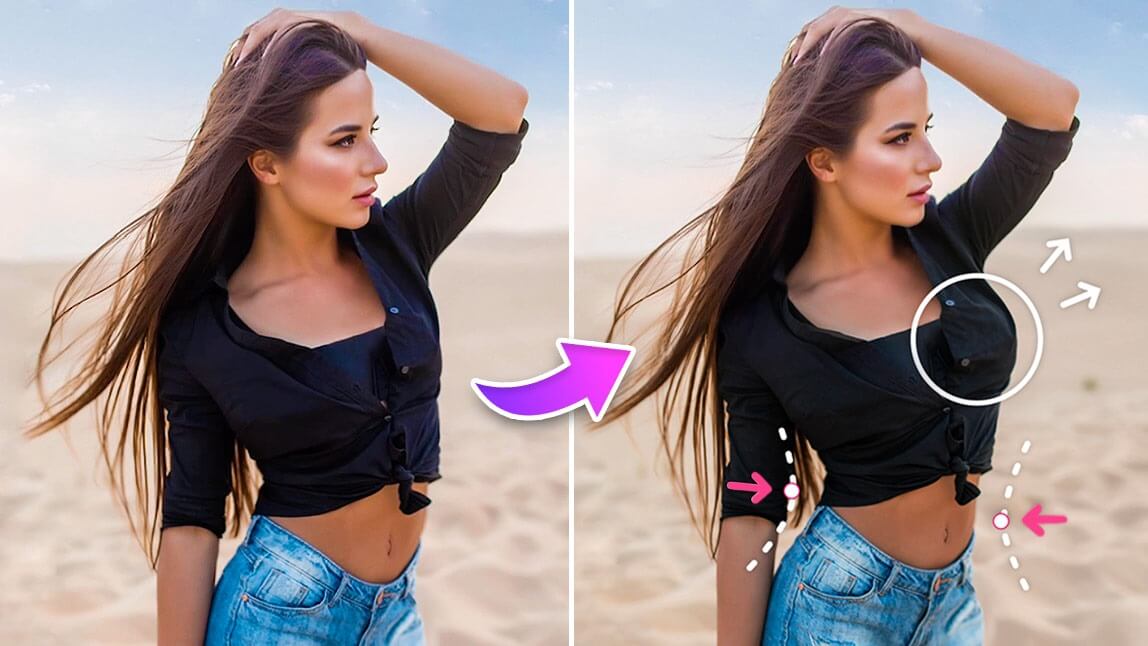
Ever wondered what you'd look like with slimmer arms, broader shoulders, or more defined curves? Now you can see the difference instantly with YouCam Perfect, the best AI body editor and app to slim body in photos.
In this guide, you'll learn how to look skinnier in photos with simple posing and photography tips, plus how to use YouCam Perfect's AI body editor to slim your body, refine your face, and enhance muscle definition.
 ▲ YouCam Perfect's Body Editor Interface
Top 7 Body Editing Tools to Try with AI Body Editor

Best AI Photo Editor
The Best AI Photo Editor & Body Editor
Remove objects, apply filters & more.
Let’s learn how to use the tools that will help you know how you might look with a different body figure.
#1 New: Add Natural-Looking Abs With AI Body Editor
V-Line
Choose V-Line for a subtle, defined look around the lower abs. It's a great option when you want a more toned appearance without adding prominent muscle definition.
Abs
This mode adds a more sculpted, athletic look while keeping the result natural.
Whether you're editing a gym selfie, vacation photo, or social media post, AI Abs gives you an easy way to enhance your physique in just a few taps.
#2 Slim Body in Photo

The AI Slim Body feature can show you how you might look with a slightly different shape. I just name it an AI that makes you look skinner and more beautiful.
#3 Add Muscle in Photo

Discover the power of YouCam Perfect in making your arms look bigger and more defined in your photos. With advanced editing tools, YouCam Perfect enables you to highlight and emphasize your arm muscles, creating a visually striking effect.
From adjusting lighting to refining shadows, the app offers precise control to enhance your arm's appearance. Whether you're showcasing your progress at the gym or simply wanting to look your best, YouCam Perfect empowers you to achieve impressive arm definition with just a few taps.
#4 Look Taller in Photo

Using the Taller feature, you can, of course, see how you’d look at a different height! To use this tool, just position the lines at your feet, midsection, and neck. From there, you can use the slider to raise or lower your height.
#5 Slim Waist in Photo

If you’re in a hurry and just want a quick and effortless adjustment, try Body Tuner’s Auto Waist feature. The tool automatically detects and adjusts your waist proportionally to achieve a natural effect. Of course, you can always make additional adjustments manually to get the look you want.
#6 Get Longer Legs in Photo
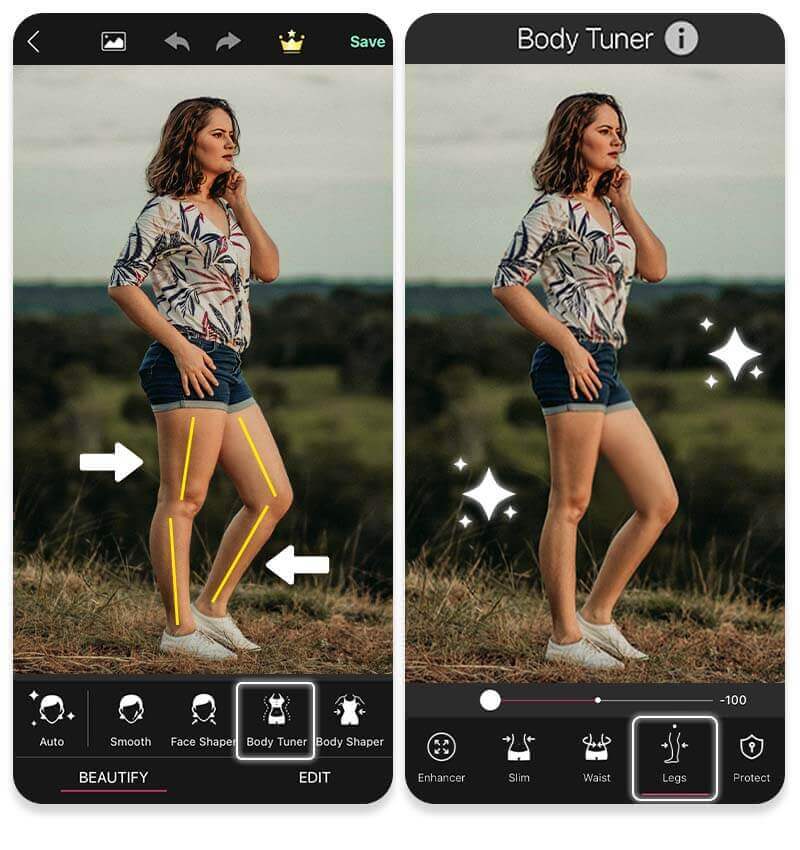
All you need to do is select the Legs options in Body Tuner and then move the slider from side to side until you achieve the result you want. So, regardless of the photo mistakes you might’ve made, you can experience what would I look like with skinny legs.
#7 Enhance Body Curves in Photo

The Enhancer aspect of the Body Tuner seeks to show you how your figure could slightly adjust and enables you to see that adjustment with the simple scroll of a slider.
This feature is great for inspiration, showing you how a higher heel or a wider dress shape could make your body appear different to the eye.
👉 Read More: How to Make Your Booty Look Bigger in Pictures with AI
Why YouCam Perfect is the Best AI Body Editor
Best AI Photo Editor
The Best AI Photo Editor & Body Editor
Remove objects, apply filters & more.
A good body editing app should do more than simply make your body smaller. It should help you control individual areas while keeping the overall photo believable.
The top 3 reason why YouCam Perfect is your go-to body editor app is as follows:
1. Body Reshape with Background Protection
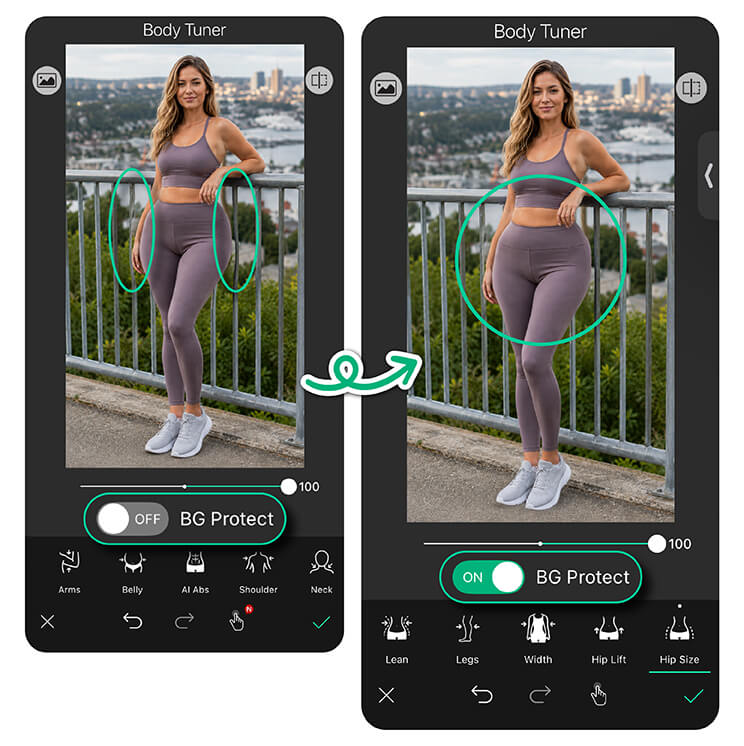
This way, you don't have to worry that the background behind you will be distorted when you edit body shape in pictures.
2. Multiple Body Editing Tools
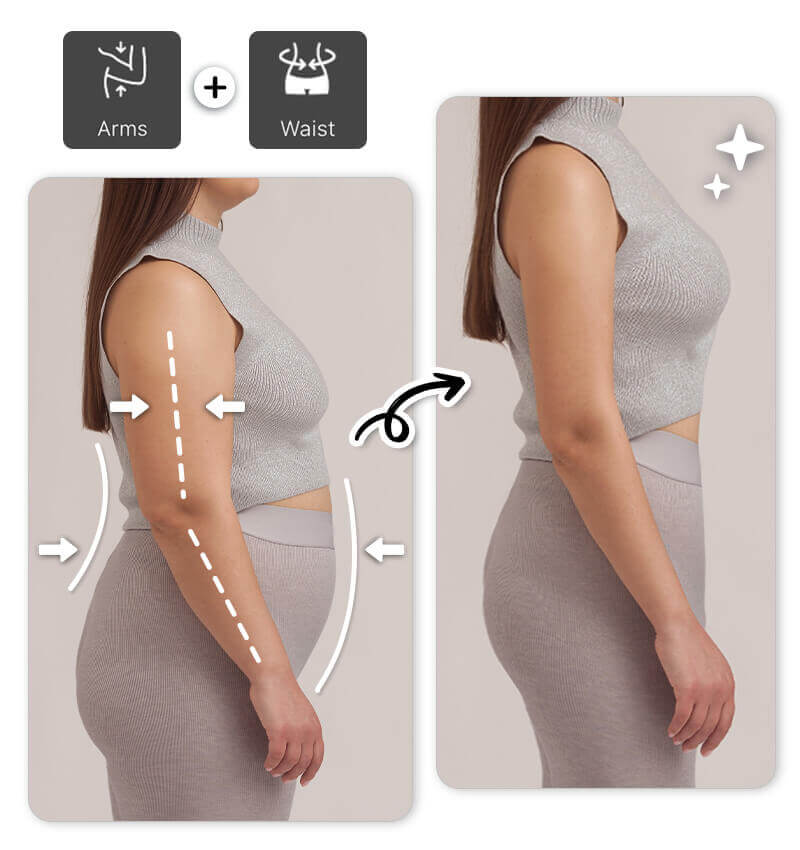
YouCam Perfect is an AI tool that makes you look skinny! It is packed with a complete line of photo body editing tools, all powered by AI. Features include Enhancer, Slim, Waist, Arms, Shoulder, Legs and Width.
3. Edit Face and Body Simultaneously

Looking slimmer in photos isn't only about your body. Your face can also appear wider depending on the camera angle, lens, lighting, and distance from the camera.
If you're searching for an app to slim your face, YouCam's face editing tools can help refine facial proportions.
Use Face Reshape to make subtle adjustments to areas such as the:
- Jawline
- Chin
- Cheeks
- Overall face shape
For the most natural result, avoid making dramatic changes to only one part of your face. Instead, make small adjustments across several areas so your facial proportions remain balanced.
Tips for Natural-Looking Body Edits
The best photo edits are often the ones people don't notice. Keep these tips in mind:
- Start small. Move the slider gradually instead of immediately applying a strong effect.
- Check the background. Look at doors, walls, furniture, and other straight lines around your body to make sure they remain natural.
- Keep your proportions balanced. If you slim your waist significantly, check your shoulders, arms, hips, and legs to make sure everything still looks proportional.
- Compare before and after. Zoom out and look at the entire image instead of focusing on one body part.
- Choose the right AI Abs mode. Use V-Line for subtle definition or Abs when you want more visible muscle detail
Final Thoughts: Look Your Best in Photos With Body Editing App
Best AI Photo Editor
The Best AI Photo Editor & Body Editor
Remove objects, apply filters & more.
Looking skinnier in photos doesn't have to mean completely changing your appearance.
A flattering pose, camera angle, lighting, and outfit can already make a difference. When you want additional control, an AI body editing app like YouCam Perfect lets you fine-tune your body and face with targeted adjustments.
From slimming your waist and arms to refining your face and adding natural-looking definition with AI Abs, you can create the look you want while keeping your edits subtle and realistic.
Try YouCam Perfect and see how a few small adjustments can transform your next photo.
Slimming App FAQs
How do I slim my body in a photo?

You can slim your body in a photo using an AI body editor like YouCam Perfect. Just upload your picture, use the Body Tuner tool, and adjust areas like waist, arms, and legs for a natural, refined look in seconds.
What is the AI tool to look slim?
YouCam Perfect is one of the top AI tools to look slim in photos. It uses advanced AI technology to reshape your body effortlessly while keeping the edits smooth and realistic
How do I make my body look slimmer without distorting the background?
Use a body editing app with background protection. YouCam Perfect's Body Tuner includes a Protect function that helps prevent selected background areas from being affected while you reshape your body.
How do I make my waist look slimmer in pictures?
You can make your waist look slimmer by using an angled pose, leaving some space between your arms and body, and choosing a flattering camera angle. For photo editing, YouCam Perfect's Body Tuner includes waist adjustment tools that let you refine your waist with a slider.
Can I add abs to a photo with AI?
Yes. YouCam Perfect's new AI Abs feature lets you add natural-looking abdominal definition to photos. You can choose between two modes: V-Line for a more subtle lower-abdomen definition or Abs for a more visible sculpted look.
What app can I use to slim my face?
YouCam Perfect's face editing tools can help you slim and reshape your face in photos. With Face Reshape, you can make subtle adjustments to areas such as your jawline, chin, cheeks, and overall face shape.



