Author:


To try on virtual hair colors, use a top-rated hair color app like YouCam Makeup, which lets you test over 150 realistic hair color filters on your photo or live camera to instantly see what hair color suits you best.
From soft brunettes to bold fantasy colors, YouCam Makeup's AI hair color changer has over 150 hair color filters to help you find what hair color suits you best.
What is Virtual Hair Color Try-On?
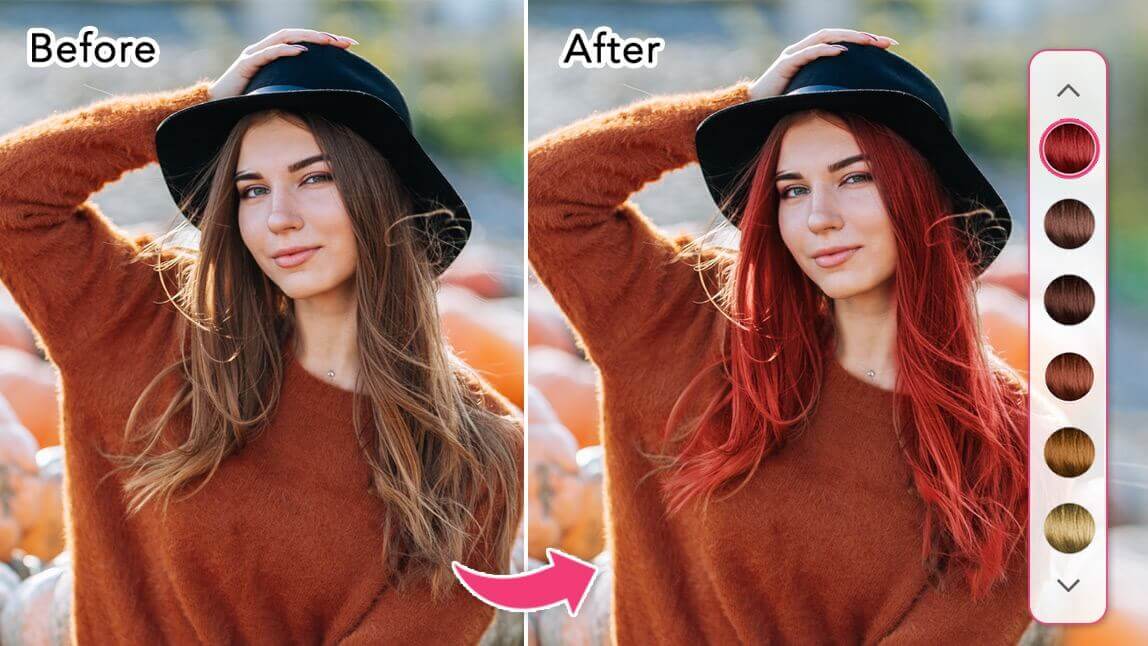
Virtual hair color try-on is a technology that uses your phone's camera and advanced Artificial Intelligence (AI) to realistically simulate different hair colors on your own photo or in real-time.
Using augmented reality (AR), a high-quality hair color app can precisely map your hair and apply any shade, from natural blondes to vibrant purples, letting you see the results instantly.
It's the ultimate way to answer the question, "What hair color suits me best?" without the commitment, cost, or potential damage of actual hair dye.
The key benefits include:
- Experiment Without Risk: Try bold, trendy colors without fear of regret or damaging your hair.
- Save Time and Money: Avoid expensive salon appointments for colors that don't work for you.
- Discover New Shades: Find flattering colors you might never have considered otherwise.
- Make Confident Decisions: Bring a photo of your virtual try-on to your stylist so they know exactly what you want.
Virtual Try-On: Basic Filters vs. Advanced Tools
| Feature | Bad/Vague Approach (Basic Apps) | Good/Specific Approach (YouCam Makeup) |
|---|---|---|
| Color Options | A limited set of 10-20 standard, often unnatural-looking colors. | 150+ realistic shades, plus a color picker for infinite custom colors. Includes multi-tone styles like ombré and highlights. |
| Realism | Color often bleeds outside hairlines and looks like a flat sticker or overlay. | Precise AI edge detection keeps color on the hair. Adjustable shine and coverage create a natural, salon-quality look. |
| Functionality | Only allows single color try-on. No other hair features. | Combines hair color try-on with over 60 AI hairstyles, allowing you to preview a complete hair makeover. |
Change your hair color with 150+ Hair Color Filters
YouCam Makeup is the best app to change hair color on your photo or with live camera. With over 150 hair color filters, the hair color app lets you try different hair colors on your photo on both iPhone and Android.

Test Hair Colors on Photo with Hair Color Filters
YouCam Makeup offers more than 150+ hair color filters for virtual hair color try-on. Some of the most popular hair color filters are:
- Black Hair Filters
- White & Gray Hair Filters
- Platinum Blonde Hair Filters
- Ginger Red Hair Filters
- Brunette Hair Filters
- Pink Hair Filters
- Rainbow Hair Filters
- Unicorn Hair Filters
Choose Hair Color Shades with Color Scale and Color Picker
You can also use YouCam Makeup's Color Picker tool to choose any color from the color scale or an existing color from your photo to get exactly the color you want!

Unique Hair Color Filters: Highlights, Ombré & More

There are also 4 different hair dye styles available, from ombré hair colors to highlights, making the virtual hair color try-on even more realistic.
Read More:
Virtual Hair Color Try-On with Virtual Hairstyles
YouCam Makeup’s hairstyle try on tool lets you test hair color on a photo and experiment with different hairstyles before making a real change.
This powerful feature in the hairstyle app allows you to try trendy cuts and styles, from sleek bobs to voluminous waves, paired with a variety of hair color filters.

How to Change Hair Color in Photos with Hair Color App
Want to switch up your look without touching a drop of dye? With YouCam Makeup, you can use AI-powered hair color filters to preview stunning shades in seconds.
- Step 1: Download the Best Hair Color App
- Step 2: Upload a Photo or Open Camera
- Step 3: Try 150+ Realistic Hair Color Filters
- Step 4: Customize Shine, Blending & Coverage
- Step 5: Save & Share Your New Look
Step 1: Download the Best Hair Color App
Start by downloading YouCam Makeup, available on both iOS and Android. It’s the best hair color app for realistic try-ons and fun makeovers.
Step 2: Upload Your Photo or Use Live Camera
Launch the app and choose between live mode (Camera) or static image mode (Photo Edit). You can either try hair colors in real-time or upload a selfie to see how each shade looks on your current style.

Step 3: Try 150+ Realistic Hair Color Filters
Explore over 150 hair shades using AI-powered hair color filters including:
- 50+ single-tone colors
- 50+ ombré shades
- 30+ two-tone combinations
- 8 multi-colored hair styles

Use the color picker to select custom hues from a palette or even from your own photo. It’s the most flexible way to find the exact shade you’re after.
Step 4: Customize Shine, Blending & Coverage
Fine-tune your virtual look by adjusting shine, coverage, and blending for a more natural finish.
For two-tone or ombré styles, swap colors between top and bottom layers. You can even erase or touch up sections for a polished, personalized result.

Step 5: Save & Share Your New Look
Once you find a shade you love, save the image for future reference or show it to your stylist for your next hair color appointment.
Why Choose YouCam Makeup for Virtual Hair Color Try-On?
Developed by Perfect Corp., YouCam Makeup is one of the most popular virtual hair color apps available for iPhone and Android. The app uses AI-powered hair detection technology to accurately apply hair colors while preserving texture, shine, and natural-looking results.
Try and Change Hair Color in Photos Now
Trying a new hair color has never been this fun or effortless. With YouCam Makeup, you can try the hair color simulator to test hair colors on your photo instantly and explore over 150 ultra-realistic hair color filters.
Ready to find your perfect shade? Download YouCam Makeup for free and start experimenting with virtual hair color try-on today!

More Virtual Hair Color Try-On Ideas
- 6 Best Hair Color Apps for Free Virtual Try-On
- From Auburn Red To Strawberry Blonde: 2024 Hair Color Trends
- Get Zoro’s Green Hair With This Green Hair Filter
- Best E-Girl Hair Color App: Try E-Girl Hair Color Filters