



 Author:


Have you ever dreamed of creating your own anime art but felt limited by your drawing skills?
With this best free AI anime generator, turning your text and photos into beautiful anime-style artwork is now a reality. Plus my own hands-on testing notes, a quick comparison against doing this by hand, and a pro-tips section for getting cleaner results.

Having tried many similar tools, I can confidently say that the YouCam AI Pro offers the best quality results in generating anime art from text descriptions or photos.
This free online tool makes it incredibly easy to create stunning anime-style artwork with just a few simple steps.
Whether you’re a seasoned artist or a complete beginner, YouCam’s AI technology ensures your creative visions come to life beautifully.
Disclaimer: The results produced by the AI Anime Generator may vary based on the input’s quality and complexity. This tool is designed for personal, non-commercial use only. By using this service, you agree to our terms and conditions.
I ran this through several rounds of testing myself before writing this up — mixing in selfies, pet photos, and a few full-body shots to see how consistently the anime look held up. Faces with clear, front-facing lighting converted the most convincingly; group shots and side profiles were noticeably more hit-or-miss, so I'd set expectations accordingly rather than assuming every photo will come out equally polished.
Worth noting: the anime-filter look is still very much alive on TikTok and Instagram going into fall 2026, with new anime/2D-style edit trends cycling through every few weeks — so a free, no-signup way to test the effect is genuinely useful right now, not just a 2024-era fad.
| Method | Best For |
|---|---|
| YouCam AI Pro (AI Anime Generator) | Fast, free, no-signup anime conversions from a text prompt or a single photo |
| Manually recreating the look (Photoshop actions/filters) | Users who already know digital illustration and want full manual control over line work and shading |
Verdict: unless you're already comfortable hand-editing in Photoshop, the AI route gets you a genuinely usable anime image in under a minute — the manual method looks more "hand-drawn" but takes real illustration skill and far longer per image.
How to Turn Text to Anime Art
Discover the simple steps to create stunning anime art online for free using an AI anime generator with this easy-to-follow guide.
Step 1. Open the Best Free AI Anime Art Generator
Start by navigating to the YouCam AI Pro app or YouCam AI Anime Generator website.
This platform is user-friendly and perfect for creating anime art effortlessly. Make sure you have a stable internet connection to avoid any interruptions.
My note: the web version loaded faster for me than the app on an older phone — if your device is a few years old, start on desktop.
Step 2. Enter Your Text Prompt of the Anime You Want
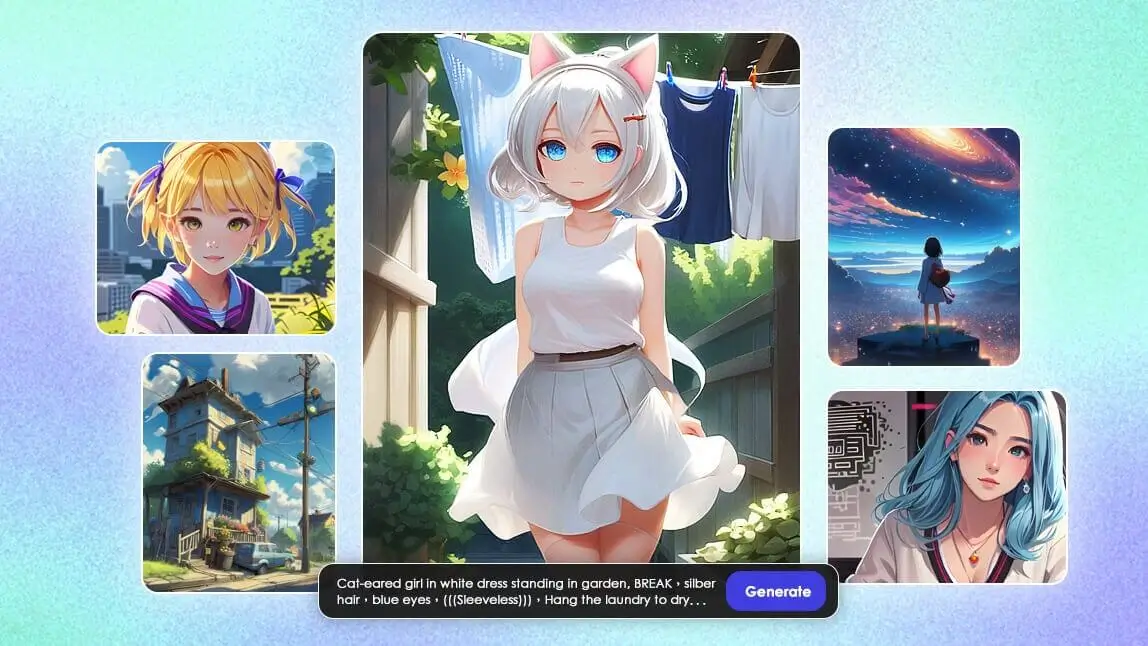
In the text box provided, type in a description of the anime art you envision.
If you’re unsure what to write, you can refer to the “Editor Choice” section for inspiration and sample prompts.
This helps the AI understand exactly what kind of anime art you want to create.
Step 3. Choose "Anime 2D" Style

Once you’ve entered your text prompt, browse through the style options and select “Anime 2D”.
This style is specifically designed to give your art that classic anime look.
The AI will then process your input and generate the artwork based on your chosen style.
Step 4. Save Your Anime Art
After the AI has created your anime art, review the final image to ensure it meets your expectations.
If you’re satisfied with the result, click the save button to download the image to your device.
Now you have your very own anime art, ready to share or use as you like!
Want to polish the result further — smooth out an odd edge, brighten the colors, or crop it for Instagram? YouCam Perfect's free photo editing tools handle that cleanup in a couple of taps once your anime art is saved.
How to Turn a Photo to Anime Style
If you want to see how you look as an anime character, you can use the YouCam AI Pro app to create anime art from photos for free.
Follow the steps below to turn your photo into a caricature easily:
- Step 1. Open YouCam AI Pro (a free AI Anime Generator App).
- Step 2. Tap “Add a photo” and upload the portrait photo you want to turn into anime-style.
- Step 3. Enter “anime style” in the “Enter your prompt” field.

- Step 4. Adjust the “Image weight” to 50~60%.
- Step 5. Tap “Generate”, and you will receive 4 anime-style photos.
Wait for the AI to create an anime art from your photos within just a few seconds, and you'll receive an anime version of yourself.
Why Create Anime Arts Using YouCam AI Pro: Top 2 Benefits
Various Anime Styles

Experimenting with different anime styles can significantly enhance the creativity of your AI-generated art.
The YouCam AI Pro offers a wide range of styles, including 2D Anime, 3D Cartoon, Anime Girl, Comic, and Princess Tales.
By exploring these options, you can find the perfect style that matches your vision and adds a unique touch to your artwork.
Turn Your Favorite Characters into Anime Style

Another way to boost creativity is by transforming your favorite movie or TV series characters into anime styles.
Simply describe the character in the text prompt, and the AI will generate an anime version of them.
This approach not only personalizes your art but also allows you to see beloved characters in a whole new light.
Pro Tips for Better Anime Results
- Be specific in your text prompt. "Anime girl, short pink hair, school uniform, soft lighting" converts far more predictably than a one-word prompt.
- Keep Image Weight around 50-60% for photo conversions. Push it higher if you want the AI to stay closer to your original photo's proportions; lower it for a more stylized, less literal result.
- Use a well-lit, front-facing photo. Side profiles and busy backgrounds are where the anime conversion gets least reliable.
- Try more than one style. 2D Anime and 3D Cartoon can look surprisingly different on the same input — it's worth generating both before picking a favorite.
What Real Users Say
YouCam AI Pro sits around a 4.1-star average on the App Store. Reviewers on justuseapp.com back up what I found in my own testing — genuinely fun results, with some real limits:
"This is absolutely fantastic" — Infamous5573186, ★★★★★
"Interesting and fun but flawed. Get 'server is not available' often." — Pablo Hinault
Legal and Ethical Guidelines for Using AI Anime Generators
- Respect Copyright Laws: Ensure that any text or photo you use does not infringe on copyright laws. Only use content that you own or have explicit permission to use. Unauthorized use of copyrighted material can lead to legal consequences.
- Personal Use Only: The AI Anime Generator is intended for personal, non-commercial use. Do not use the generated anime art for commercial purposes without proper authorization. This helps protect the rights of original content creators and the integrity of the tool.
- Avoid Harmful Content: Do not input text or photos that contain harmful, offensive, or inappropriate content. The tool should be used responsibly to create positive and respectful anime art. Misuse of the tool to generate harmful content can lead to restrictions or bans.
- Privacy and Consent: If you are using photos of people, ensure you have their consent before uploading their images. Respect the privacy of individuals and avoid using images without permission. This is crucial for maintaining ethical standards and respecting personal boundaries.
- Transparency and Honesty: Be transparent about the use of AI-generated content. If you share the generated anime art, clearly indicate that it was created using an AI tool. This maintains honesty and helps others understand the origin of the content.
Start Creating Anime Art for Free With the Best AI Anime Generator in 2026
Ready to bring your anime ideas to life?
With the top AI anime generators of 2025, you can transform text concepts into impressive anime art, even without professional editing skills.
Embark on your anime creation journey with these leading AI Anime Generators, turning imagination into breathtaking visuals with just a few clicks!


