Author:


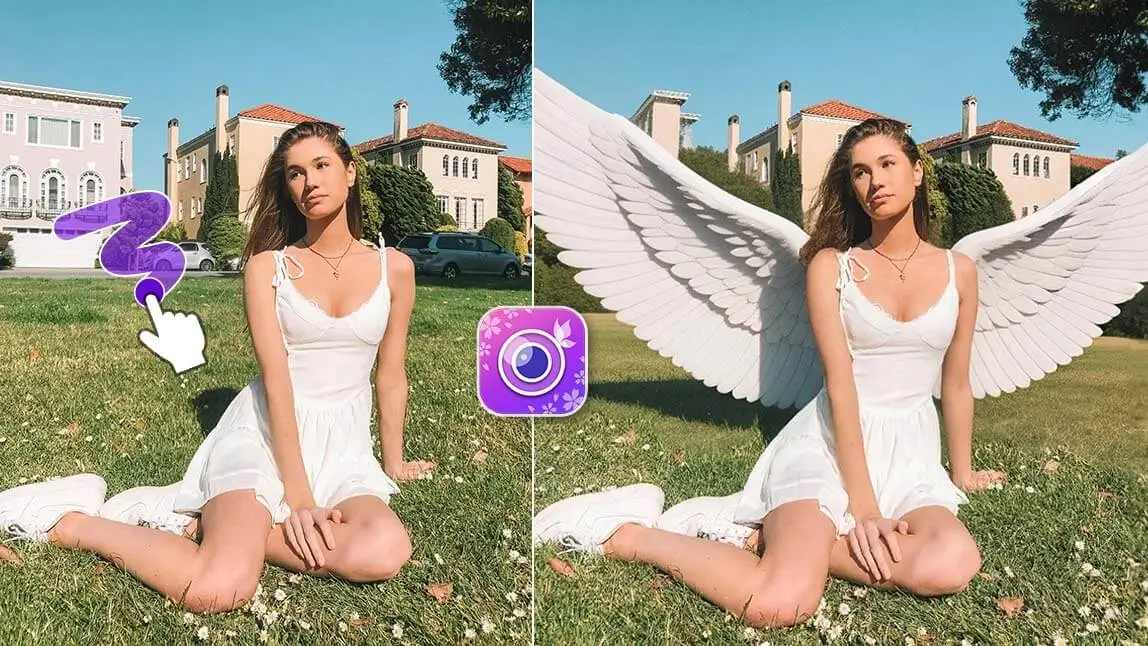
You may think that angels and fairies only exist in stories or imagination, but in fact, transforming into an angel is no longer just a dream! Or if you are struggling to find an app to edit rip angel wings pictures, no worries!

| Table of Contents |
|---|
What Is the Free App to Add Angel Wings?
If you're looking for a free app to add angel wings to photos, YouCam Perfect is one of the easiest and most versatile options available. The app offers multiple ways to create angel-themed photo edits, including AI-generated angel wings, angel avatars, animated wing effects, and angel wing stickers.
Whether you want a realistic angel portrait, a fantasy-inspired social media post, or a fun photo effect, YouCam Perfect lets you create angel wing edits in seconds on both iOS and Android devices.
I ran a few different selfies and photos through all five in-app methods plus the browser version to see how they actually compared — the AI-generated options (Angel Avatar, AI Replace) took the most patience but gave the most polished results, while stickers and the animated wraparound were near-instant but more stylized than realistic.
How to Add Angel Wings to Photos in 5 Ways
YouCam Perfect is the best angel wings photo editor, which allows you to put angel wings on a picture in 4 different ways, including AI Angel Avatar, Angel Wings Animation, and more.
#1. Add Wings to a Picture using AI Angel Avatar
The Artistic Avatar feature in YouCam Perfect is an AI tool that can generate different styles of avatars of you. You can turn yourself into an angel simply by uploading one photo!
Step1. Download the best free angel wing photo editor app YouCam Perfect on App Store or Google Play.
Step2. Go to Artistic Avatar and select the "Golden Whisper" style. You can choose up to 5 styles at once, and we recommend you to also try Fairy Princess. Celestial, and Unicorn.

Step3. Upload a photo of yourself with a clear face and no coverings.
Step4. Wait for AI to generate an angel avatar of you.

When I ran a few different selfies through the Golden Whisper style, the wing placement and lighting looked consistent each time — but the AI-rebuilt face came out closer to a stylized fantasy portrait than an exact likeness, which tracks with this being a full avatar regeneration rather than a light touch-up.
Read more: Vampire Filter: How to Turn Yourself into a Vampire
#2. How to Put Angel Wings on a Photo
The AI Replace feature in YouCam Perfect generates realistic angel wings with AI and allows you to replace simple backgrounds with them. Here are the steps:

In my testing, painting a slightly wider mask around the shoulders than felt necessary gave AI Replace more room to blend the wing edges naturally — a tight, close paint job tended to leave a faint seam where the wings met the body.
- Download the AI Angel App, YouCam Perfect, on App Store or Google Play.
- Click Photo Edit and select a photo you want to add wings to.
- Find the AI Replace feature in the tool bar.
- Paint over the area on the two sides of your body, where you want to put angel wings on.
- Type in “angel wings” as your prompt and tap “replace”.
- The AI angel wing photo editor will get you a realistic angel wing background!

#3. Angel Wings Animation
If you’d like to add angel wings background to your photo, you can also try the animated wraparounds in YouCam Perfect. Follow the steps to try it by yourself:
I noticed the animated wraparound effect reads best against a plain or simple background; a busier background made the wing loop feel a little distracting rather than dreamy.

- Get the Angel Wings Photo Editor YouCam Perfect on App Store or Google Play.
- Upload the photo you want to add angel wings to after navigating to Photo Edit.
- Click Animation, and find the angel wings background under the Wraparound feature.
- Adjust the placement to make it look more natural.
- Save and share your angel wings photo!

Read more: Skeleton Filter: Add Skull Filter to Photo
#4. Angel Wings Stickers
This was the fastest of the five methods when I tried it — no AI processing wait at all — though static stickers obviously don't have the same depth or realism as the AI-generated options above.
If you prefer a cute version of angel wings, try adding angel wings stickers in your photos! YouCam Perfect provides a package of angel wings stickers for you to choose.

- Get the angel wings photo editor app, YouCam Perfect.
- Tap Photo Edit and upload the photo you are editing.
- Click Stickers in the tool bar and tap the store icon.
- Find the angel wings sticker package and apply one of them to your photo.
- Successfully added angel wings to photo!

The render took a couple of minutes when I tested it, longer than any of the other four methods, but the resulting motion looked smoother than I expected from a single still photo.
#5. Try Image-to-Video
In YouCam Perfect, there's also a feature called "Image-to-Video", which you only need to upload a selfie, and choose a video template you like, the feature will help you turn the picture into animation.

- You can find a template for "Angel" under the "Transform" section
- Click on the Generate button and wait for a few minutes
- And that's it! Download the video to share it to your friends or family.
Add Angel Wings to a Photo Online Free
Looking for an angel wing photo editor online? We also have a solution for you! Look up "YouCam Online Editor", you can either add a pair of angel wings to your photo, or you can upload a selfie of you to generate an angel avatar.
Testing the browser version on desktop, the workflow felt nearly identical to the app's AI Replace tool — same paint-and-prompt approach — which is convenient if you'd rather skip downloading an app just to try one edit.

Here's how it works:
- Visit the YouCam Online Editor - AI Replace page
- Upload your photo that you wish to add angel wings to
- Paint over the picture where you want the angel wings to be
- Enter prompt like "white angel wings", and click on "Replace"

Which Angel Wings Method Should You Use?
| Method | Best For |
|---|---|
| AI Angel Avatar | A full fantasy-style angel portrait remade from a selfie, not just wings added to your existing photo |
| AI Replace | Realistic-looking wings added directly onto your original, unedited photo |
| Angel Wings Animation | Eye-catching motion content for Stories/Reels rather than a static image |
| Angel Wings Stickers | The fastest, simplest edit — no AI processing wait |
| Image-to-Video | Turning a single still selfie into a short shareable video clip |
| Manual/DIY editing | Full manual control over wing placement and blending, for users comfortable with a longer learning curve and no AI assist |
Verdict: For most people who just want a realistic angel-wings photo without learning manual editing, AI Replace is the best all-around pick — it works directly on your existing photo rather than regenerating your whole face like Angel Avatar does. Stickers and Animation are better picks when speed or motion matters more than realism. Manual/DIY editing only makes sense if you already know your way around a desktop editor and want full control over the blend.
And there you have it! You can also choose among the generated pictures to find the one you like the most. The AI Replace tool allows you to add angel wings to photo using AI, so the result is pretty natural.

Final Thoughts of Angel Wings Editing
Looking for a free app to add angel wings to your photos? YouCam Perfect offers AI angel wings, angel avatars, animated wing effects, and angel wing stickers, making it one of the best free angel wing photo editors available today.
Play around with styles and have fun creating your perfect angelic shot!