Author:


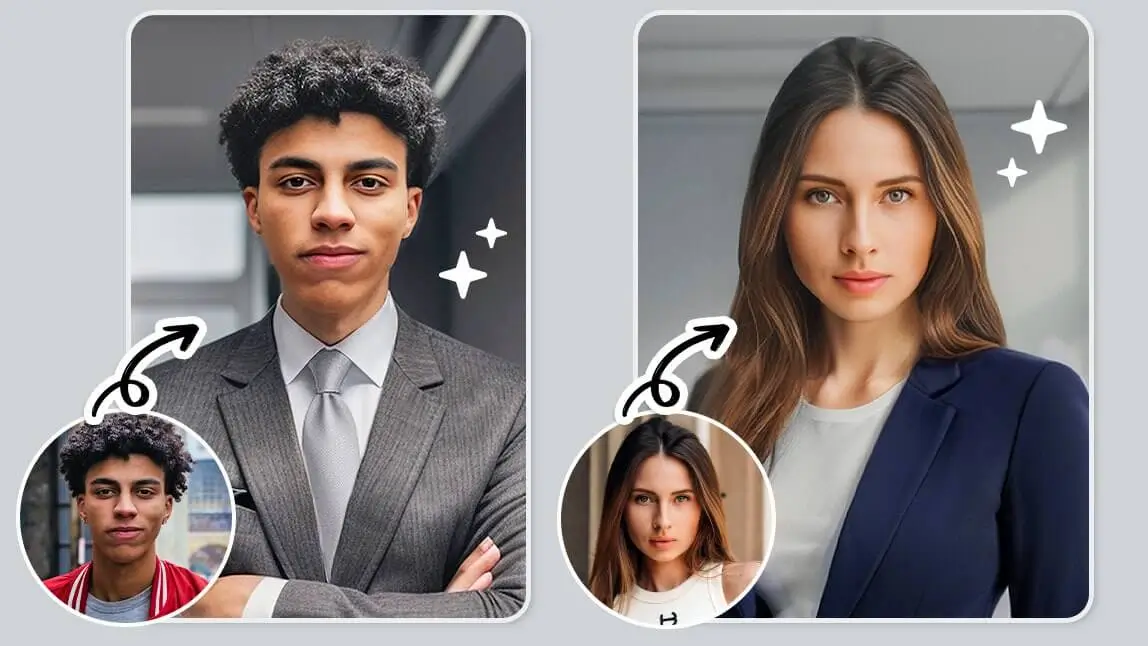
In today's competitive job market, having a professional and impressive headshot is crucial. With an AI headshot generator, you can easily create realistic professional photos, without the fuss of scheduling a photoshoot.

▲ AI professional headshot results from YouCam Perfect
Read on to see how you can easily generate realistic and professional AI headshot images with one of the best solutions in the market!
Top 5 AI Headshot Generators for Professional and Realistic Results [Tested and Reviewed]
AI headshot generators offer a diverse range of styles to cater to various needs and preferences; here, we’ve listed 5 popular options for realistic professional portraits:
- YouCam Perfect: Best for High-Quality AI Headshots in Office Styles
- Photoleap: Best for Diverse Occupations Headshots
- MagicShot: Best for All-in-One Headshots and Creative Tools
- Fotor: Best for Online AI Headshot Generation
- HeadshotPro: Best for Studio-Quality Team & Corporate Headshots
YouCam Perfect: Best for High-Quality AI Headshots

With one of the best AI headshot generators, YouCam Perfect, you can easily generate high-resolution AI headshots that are natural-looking.

Simply by uploading one photo, You can easily generate AI headshots from the classic "head and shoulders" poses to "arms crossed" postures, or even suits in colors ranging from light blue to classic white shirt styles.
Press Here to learn how to create AI professional headshots in YouCam Perfect!
YouCam Perfect's AI Headshot Test Review:
- Number of photo uploads: 1
- Highly realistic, face angles in outcome pictures will be the same as input images
- Various styles (even including formal dress options) to meet different job-hunting needs

▲ Various options in YouCam Perfect's "AI Headshot"
Summary
In summary, YouCam Perfect stands out from its natural face result, easy-to-use process that only requires one photo, also its variety of professional outfit styles.
"YouCam Perfect is so much fun! The photo edit toolkit gives you all the tools and effects to feel like a professional photographer." — Linds_makeup1, 5-star App Store review
"I have to start all over again, (which is very frustrating,) especially when using templates." — LadyMelinda, 3-star App Store review
Photoleap: Best for Different Occupation's Headshots
Unlike most popular AI headshot creators, Photoleap uses AI filter applications to help users generate perfect and natural AI headshots.
The AI headshot app offers 30+ styles (each filter supports regeneration), featuring a variety of backgrounds from "Sporty" to "Urban," and clothing styles such as "Scholar", "Blazer", and more!
Photoleap's Test Review:
- Number of photo uploads: 1
- Apply AI filters to the user's original image to change outfits & backgrounds
- Wide variety of styles for different occasions and business usage
As the app uses AI filters to create studio headshots, we recommend using input pictures taken at eye-level camera angles and ensuring the lighting is natural without causing shadows on faces.
Summary
If you need headshots for your corporate profile or website, Photoleap can help you create casual corporate headshots that reflect your brand's personality. These headshots are professional yet approachable, making them ideal for showcasing your team members or executives.
MagicShot: Best for All-in-One Headshots and Creative Tools
MagicShot's Headshot Generator is best for people who want professional headshots plus a full creative studio in one place. You can generate headshots across multiple styles, outfits, and backgrounds (business, corporate, and casual profile looks), then use the same account for image editing, product photos, and video. It runs on top AI models and exports in up to 4K, so results look sharp enough for LinkedIn, resumes, and company pages.
Available: Web & iPhone
Rating: Trustpilot 4.7/5 ("Excellent")
MagicShot's Test Review:
- Number of photo uploads: multiple selfies per batch
- Generates studio-style headshots across several outfits and backgrounds
- Part of an all-in-one studio (85+ tools) with up to 4K export
Summary
MagicShot is a web-based AI studio that does far more than headshots, with image editing, product photos, and video on the same account. It leans toward creators who want one affordable subscription rather than a single-purpose headshot app, with paid plans from $9/month and no app install needed, since everything runs in the browser.
Fotor: Best AI Headshot Generator for LinkedIn Headshots
Fotor's AI Headshot tool is best for people to generate LinkedIn headshots. Users can select up to 10 styles at once, including business attire, corporate headshots, and profile photos for LinkedIn. For students, the AI headshot app also supports the “Vintage Degree” style that can generate AI headshots of you wearing a cap and gown.
Fotor's Test Review:
- Number of photo uploads: 8~15
- Generate AI avatars according to multiple input pictures from users
- Available to generate AI headshots once for free after a subscription
Users should first upload a photo with clear facial features, and then upload 8~15 selfies to help their AI come up with more accurate outcomes.

▲ LinkedIn headshot made with AI headshot
Summary
With Fotor's natural and high-quality AI headshot results, you can generate eye-catching LinkedIn headshots that grab attention and leave a lasting impression on your profile visitors.
HeadshotPro: Best for Studio-Quality Team & Corporate Headshots
Available: Web
Rating: Trustpilot 4.7/5 ("Excellent")
HeadshotPro's Test Review:
- Number of photo uploads: multiple selfies per batch
- Generates studio-style headshots across several outfits and backgrounds
- Offers team and company plans plus optional human retouching add-ons
Summary
HeadshotPro is a web-based tool rated "Excellent" on Trustpilot (around 4.7/5), and it leans into corporate and team use cases rather than a quick single portrait, with company-wide plans for a consistent look across a whole staff directory. It costs more than an app-based option and requires no app install, since everything happens through the browser.
How to Generate Professional AI Headshots In 3 Easy Steps

Getting your AI-generated professional headshots is a straightforward process. Just follow these steps:
- Press Feminine/Masculine, then select 1~5 headshot styles
- Upload pictures of yourself
- As you receive the notification, save your AI headshots
Tips to Get Your Perfect Professional AI Headshots

We understand that first impressions are important, especially when using headshots for business. Here we've listed some "Do's and Don'ts" for you when generating AI professional headshots:
Do's
- Should include shoulder for more natural results
- Photos taken under natural lighting
- Make sure to smile!
Don'ts
- Avoid hair covering your face
- Avoid shadows from your faces
AI Headshots FAQs

Can You Use AI for a Headshot?
Yes, AI technology is widely used for creating professional headshots. It utilizes advanced algorithms and machine learning techniques to generate realistic and high-quality headshots.
For some popular AI headshot generators like YouCam Perfect and Fotor, the "AI Headshot" feature will require users to upload several images to generate realistic professional headshots, while an AI headshot app like Lightleap uses AI filters to help users get their results within seconds.
Is there an app for professional headshots on iPhone?
Top 3 AI professional headshot apps for iPhone:
- YouCam Perfect (iOS Rating 4.8)
- Photoleap (iOS Rating 4.7)
- Fotor (iOS Rating 4.7)
What Is the Best Headshot AI?
YouCam Perfect has the best AI for users to easily get professional headshots using their images taken from cell phones.
The AI headshot generator currently supports 10+ styles for both male and female users; whether you need headshot portraits for updating LinkedIn profiles or refreshing corporate headshots, the AI within can accurately create your professional portraits that impress headhunters and your potential clients!
What is the best app for professional headshots?
4 Best professional photo apps for AI headshots in 2026:
- YouCam Perfect (iOS 4.8, Android 4.3)
- Photoleap (iOS 4.7, Android 4.4)
- Fotor (iOS 4.7, Android 4.1)
- HeadshotPro (Trustpilot 4.7/5, web-based)