Author:


When it comes to creating beautiful portraits with the help of AI, the right prompt makes all the difference. Whether you're leveling up your photography concepts, planning a creative shoot, or transforming an ordinary snapshot into something polished and professional, having curated ChatGPT photo prompts on hand can save time and spark inspiration.

In this guide, you’ll find 15 easy copy-and-paste ChatGPT photo editing prompts you can use for portraits in any style. You’ll also learn how to use YouCam Perfect’s AI Agent, an intuitive tool that lets you apply pro-level photo edits without complex software or retouching skills.
How to Use ChatGPT Photo Prompts with YouCam Perfect
YouCam Perfect’s AI Agent allows you to apply styles, lighting, and ambiance changes using simple prompts. You don’t need photo editing skills because the tool handles the creative interpretation for you.
Step 1: Download and open YouCam Perfect on your mobile phone.

Best AI Photo Editor
The Best AI Photo Editor & Selfie Camera.
Remove objects, apply filters & more.
Step 2: Tap the Image to Image feature to access the prompt editing tool and upload your photo.
Step 3: From the multi-model menu, select GPT-Image-1.5 and paste one of the prompts from the list above.
Step 4: Tap generate and save.

The process is simple and works for selfies, portraits, lifestyle photos, or creative concepts.
[New Trend] ChatGPT Photo Prompts for Caricature Portraits
Caricature-style portraits are perfect if you want something playful, eye-catching, and full of personality. Instead of realistic proportions, caricature prompts guide AI to exaggerate facial features while keeping the subject recognizable.
Try this Prompts: "Turn the uploaded photo into a colorful caricature illustration. Playfully exaggerate facial features like the eyes and smile while keeping the person recognizable. Clean cartoon style, smooth lines, vibrant colors, simple background."

15 ChatGPT Photo Prompts for Realistic Portraits
Here are 15 curated ChatGPT photo editing prompts for the stunning portraits. Copy, paste, and customize them based on your subject.
#1. Soft Window Light Portrait
Prompt: "Generate a realistic portrait of the woman in the uploaded photo in her 30s smiling softly with a slight head tilt, seated near a sunlit window, natural makeup, loose beige sweater, shallow depth of field for a warm lifestyle look."
#2. Workshop Close Up

Prompt: "Generate a close up portrait of the man in the uploaded photo with a beard and thoughtful expression, arms crossed, standing in a dim workshop with warm rim lighting, denim shirt with rolled sleeves, blurred tools in the background."
#3. Wildflower Field Golden Hour

Prompt: "Generate an outdoor portrait of the woman in the uploaded photo laughing with wind blown hair, standing in a wildflower field at golden hour, wearing a white linen dress, soft bokeh behind her."
#4. Porch Portrait

Prompt: "Generate a warm portrait of the man in the uploaded photo with deep wrinkles and gentle eyes, sitting on a porch, flannel shirt, neutral expression, hands resting on a cane, shallow depth of field."
#5. Studio Power Portrait

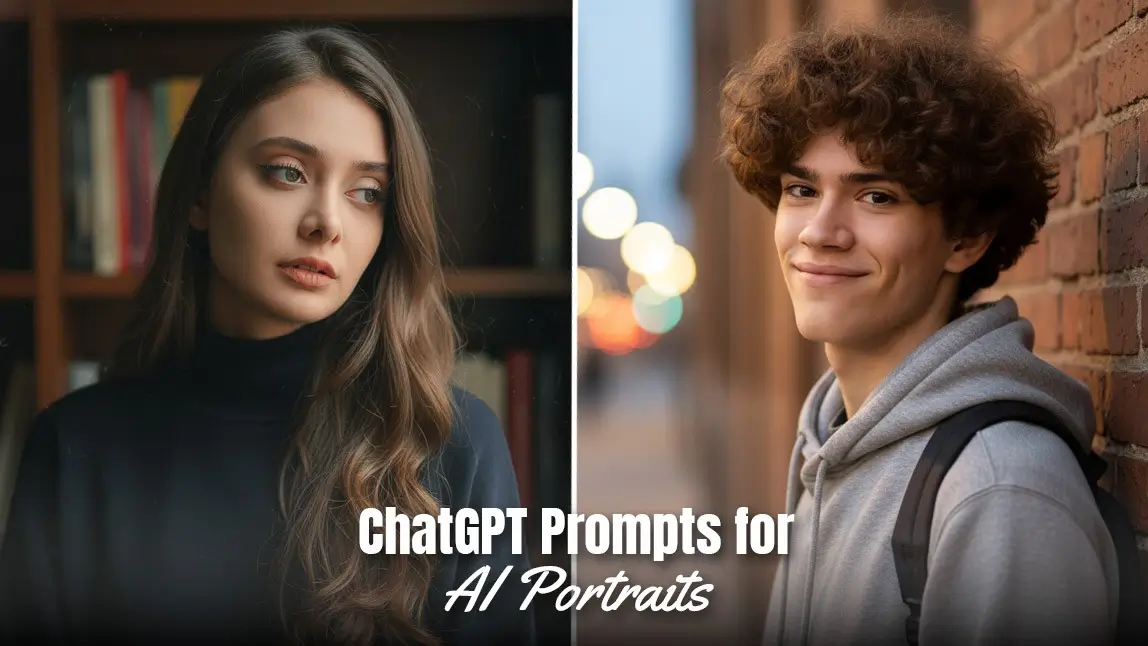
Prompt: "Generate a studio portrait of the woman in the uploaded photo wearing a tailored black blazer, direct eye contact, slight smirk, seamless gray backdrop, crisp key lighting for a professional look."
#6 Urban Brick Wall Portrait

Prompt: "Generate an urban portrait of the man in the uploaded photo leaning against a brick wall with a relaxed smile, wearing a hoodie and backpack, evening street lights creating creamy bokeh."
#7. Freckled Indoor Close Up

Prompt: "Generate a close portrait of the woman in the uploaded photo with freckles and an intense gaze, chin resting on her hand, soft natural window light, cozy indoor background."
#8. Musician Tuning Guitar

Prompt: "Generate a portrait of the man in the uploaded photo tuning a guitar with a candid expression, warm stage lights glowing behind, casual tee and jeans, blurred instruments in the background."
#9. Winter City Park Portrait

Prompt: "Generate an outdoor portrait of the man in the uploaded photo wearing a wool coat and scarf, calm expression, cold morning light in a city park."
Read More: AI Snow Trend: Create Magical Snow Photos with AI Snow Photo Prompts
#10. Post Run Athlete Portrait

Prompt: "Generate an energetic portrait of the woman in the uploaded photo catching her breath after a run, determined expression, neon sportswear, blurred running track behind."
#11. Chef in Kitchen Close Up

Prompt: "Generate a close up portrait of the woman in the uploaded photo with chef’s clothing with a proud smile, arms relaxed at sides, white apron, stainless steel kitchen surfaces softly blurred in the background."
#12. Cozy Reading Moment

Prompt: "Generate a portrait of the woman in the uploaded photo reading on a couch with a serene expression, glasses slightly lowered, warm lamp light and soft shelf bokeh behind."
#13. Rustic Cowboy Portrait

Prompt: "Generate a portrait of the man in the uploaded photo wearing a cowboy hat, squinting slightly in the sun, rustic barn backdrop, plaid shirt, DSLR depth of field."
#14. Dramatic Side Light Indoor Portrait

Prompt: "Generate a moody portrait of the woman in the uploaded photo with dramatic side lighting and a contemplative expression, dark turtleneck, blurred bookshelf for ambience."
#15. Graffiti Wall Teen Portrait

Prompt: "Generate an outdoor portrait of the teenager in the uploaded photo with headphones around their neck and a playful grin, vibrant graffiti wall behind with soft blur."
Level Up Your Portraits with AI
AI portrait photo editing makes it easier than ever to create polished and beautiful results. By using clear ChatGPT photo prompts, you can guide AI to enhance lighting, facial features, and overall beauty style with greater accuracy.
When combined with YouCam Perfect’s AI Agent, these prompts turn ordinary photos into professional-looking AI portraits. From natural skin smoothing and beauty enhancement to background and lighting adjustments, AI-powered photo editing helps you achieve realistic, high-quality portraits in just a few taps.
Why Use ChatGPT Photo Prompts for Editing?
Photo prompts help AI tools and editors understand the scene, lighting, mood, and styling you want. They work especially well when paired with tools like YouCam Perfect’s AI Agent, which can quickly interpret refined prompts to create polished, realistic results.
These prompts are especially useful for:
- Enhancing portraits
- Creating new looks or moods
- Editing backgrounds and lighting
- Planning photoshoot concepts
- Polishing everyday selfies
Read More: 50+ Magical ChatGPT Christmas Prompts for Stunning Holiday Images
Create AI Portrait Photos With Prompts
If you’re exploring ChatGPT photo prompts, this list gives you everything you need to create realistic, creative, and beautifully styled portraits. Pairing these prompts with YouCam Perfect’s AI Agent makes it easy to generate polished results in just a few taps.
Whether you're building a portfolio, refreshing social media photos, or simply experimenting with AI, these prompts offer endless inspiration.
About the Editors

The PERFECT Corp. Editorial Team
We are a team of experts on photo and video editing apps. Our goal is to deliver engaging content on everything from stunning selfie edits to eye-catching video effects. We cover the latest trends and share niche tips to help you master digital creation.
Discover more about us: