


 Author:


Updated October 2026: added a tap-to-flip mirror vs. true view demo, clarified how accurate the inverted filter really is, and fixed the flip steps.
Ever wondered what you really look like to others? The inverted filter — sometimes called the inverted face filter — flips your face to give you a new perspective.
What Is Inverted Filter?
Mirror vs. true view: tap to flip the same selfie

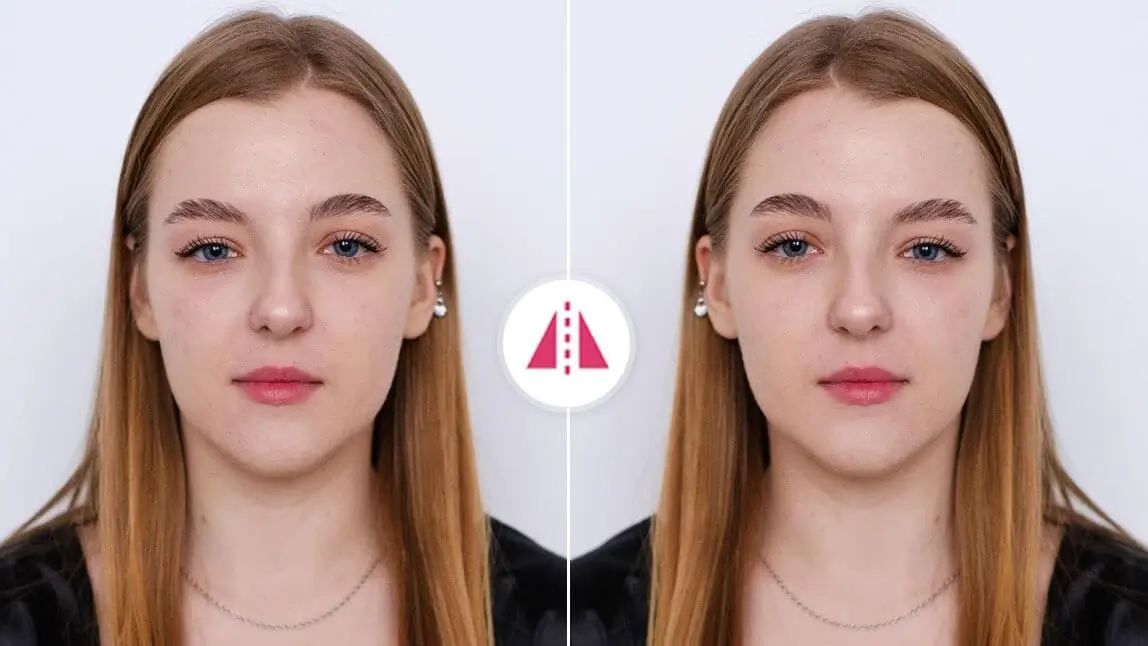
Mirror view: this is what your front camera preview and bathroom mirror show — left and right are swapped. It’s the version of your face you’re most used to, which is why it usually feels “right.”
True view: this is the same photo the right way around, the way people facing you see it. Watch the hair part and where the hair falls on each shoulder switch sides. If your selfie looks “off,” it’s usually because your brain expects the mirror version.
In short: your front camera and mirror show a left-right reversed image. The inverted filter flips it back, so the parting of your hair, a one-sided smile or a freckle appear on the side other people actually see them.
The inverted filter flips your face left to right — the reverse of what you usually see in your phone’s front camera. Since most selfies show a mirrored version of yourself, the inverted view can look unusual at first.
A note on the trend (October 2026): the inverted filter first went viral on TikTok in early 2021, and it still resurfaces whenever people post “mirror vs. real me” comparisons. TikTok’s effect library changes over time, so if you can’t find the effect there, flipping the photo in any editor gives you the same left-right result.
The face inverted filter isn’t just for fun. Many people use it to compare the two sides of their face. Almost no face is perfectly symmetrical, so small differences — a higher eyebrow, a lopsided smile, a part on one side — are normal. Flipping your face simply makes them easier to notice.

What Do I Look Like to Other People?
Most of us are used to seeing ourselves in the mirror — a flipped version of our face. But the way others see you is slightly different, and that’s where the inverted filter comes in. By flipping your face left to right, this filter gives you a fresh perspective on your features.
Use a Reliable Photo Editing App
For photos, apps like YouCam Perfect let you flip your selfies instantly. Simply upload your photo, select Crop & Rotate, and choose Flip Left/Right. In just a few clicks, you’ll see your face as others do.
Compare with Your Mirrored Selfie
Place your flipped image next to your original selfie. Notice the subtle differences — a slightly asymmetrical smile, the way your eyes sit, or the shape of your jawline. These small details can help you understand your facial balance better.
Explore Facial Symmetry
Want to go further? YouCam Perfect’s Mirror Tool can create a fully symmetrical version of either side of your face. This is perfect for spotting which side is dominant and understanding how symmetry affects your appearance.
Inverted Filter: How to Flip Your Face from Left to Right
If you're struggling to find an inverted filter on your phone, YouCam Perfect has you covered! Simply follow the steps below to see your face flipped left and right.
Step 1. Download the best inverted face filter app, YouCam Perfect, for free.

Best AI Photo Editor
The Best AI Photo Editor & Selfie Camera.
Remove objects, apply filters & more.
Step 2. Upload one of your selfies after clicking Photo Edit
Step 3. Find Crop & Rotate in the menu and tap Flip Left/Right.
Step 4. Save your inverted selfie — that’s how your face looks with left and right the right way around.
How to Make an Inverted Filter Video for Social Media
Besides being curious about how they look to others, many people also like sharing inverted filter videos on social media. Follow the steps below to create your own inverted filter video:
Best AI Photo Editor
The Best AI Photo Editor & Selfie Camera.
Remove objects, apply filters & more.
Step 1. Screen Record While Flipping Your Photo
Go to Crop & Rotate and use the Flip Left/Right tool to create the inverted version of your photo. While doing this, turn on screen recording on your phone to capture the before-and-after change.
Step 2. Edit Your Screen Recording
After recording, open the video editor on your phone and trim the clip so the transformation appears clear and smooth.

Step 3. Crop the Video to the Right Size
Adjust the video size to fit social media formats, such as vertical 9:16 videos for TikTok, Instagram Reels, or YouTube Shorts.

Step 4. Export and Share on social media
Once you’re done editing, export the video and upload it to social media to share the mirrored vs. inverted face comparison.
💡 Tip: If you want more advanced video editing options, you can download YouCam Video to add effects, transitions, or other creative edits to your inverted filter videos.
How to Use the Inverted Filter Online?
If you prefer not to download an app, you can also try an inverted filter online using YouCam Online Editor. With its advanced AI Image Generator, you can create an inverted or flipped face effect directly in your browser — perfect for quick edits, creative experiments, or social content.
Step 1: Open YouCam Online Editor & Choose AI Image Generator
Go to YouCam Online Editor and select the AI Image Generator feature. This tool lets you transform photos using text prompts — including inverted or mirrored effects.
Step 2: Select an AI Model
Choose an AI model before generating your image.
👉 Nano Banana Pro is recommended for realistic facial details and accurate left-to-right inversion results.
Step 3: Enter Your Prompt
In the prompt box, describe the effect you want. For example:
-
“Create an inverted face filter by flipping the face left to right.”
-
“Generate a photo showing how others see me using an inverted filter.”
Clear prompts help the AI generate more accurate inverted results.
Step 4: Upload Your Photo
Upload a clear selfie or portrait photo. Front-facing images with good lighting work best for inverted face effects and facial symmetry analysis.
Step 5: Generate & Save
Click Generate, preview the result, and save your inverted image once you’re happy with it. You can easily download or share your flipped face photo online.

Is the Inverted Filter Accurate?
The question “Is the inverted filter accurate?” has two answers: yes and no in different scenarios.
Why is the inverted filter so weird?
While the inverted face filter does flip your image horizontally, it doesn’t perfectly replicate how the human eye sees you in real life. True appearance is influenced by 3D perspective, lighting, and camera distortion — all factors that a simple flip doesn’t fully address.
People often feel the inverted image looks strange or even “worse” because we’re used to seeing our mirror selves — not because the inverted version is a definitive truth.
How To Make Your Face Symmetrical?
As we mentioned earlier, you may want to check your face symmetry by placing an inverted selfie next to your original photo.
Try placing an inverted selfie next to your original photo to spot subtle differences. YouCam Perfect's Mirror tool acts like a symmetrical face filter, letting you create a mirrored version of either side of your face.

- Step 1. Get the symmetrical filter app, YouCam Perfect.
- Step 2. Click Photo Edit and upload your photo.
- Step 3. Tap Mirror in Tools.
- Step 4. Move the slide bar and adjust the distance between the two ‘you’s.
- Step 5. Check your face symmetry!

Try the Inverted Camera Filter With YouCam Perfect
The inverted face filter and face flip filter are more than just trending effects — they’re a fun way to discover a different side of yourself. Whether you use the inverted camera filter for videos or the inverted mirror filter for photos, it’s a simple way to explore how others see you.
With YouCam Perfect, you can try the face inverted filter in seconds and even test your facial symmetry. You might be surprised by what you find — and you might just like the result.
Best AI Photo Editor
The Best AI Photo Editor & Selfie Camera.
Remove objects, apply filters & more.


