


 Author:


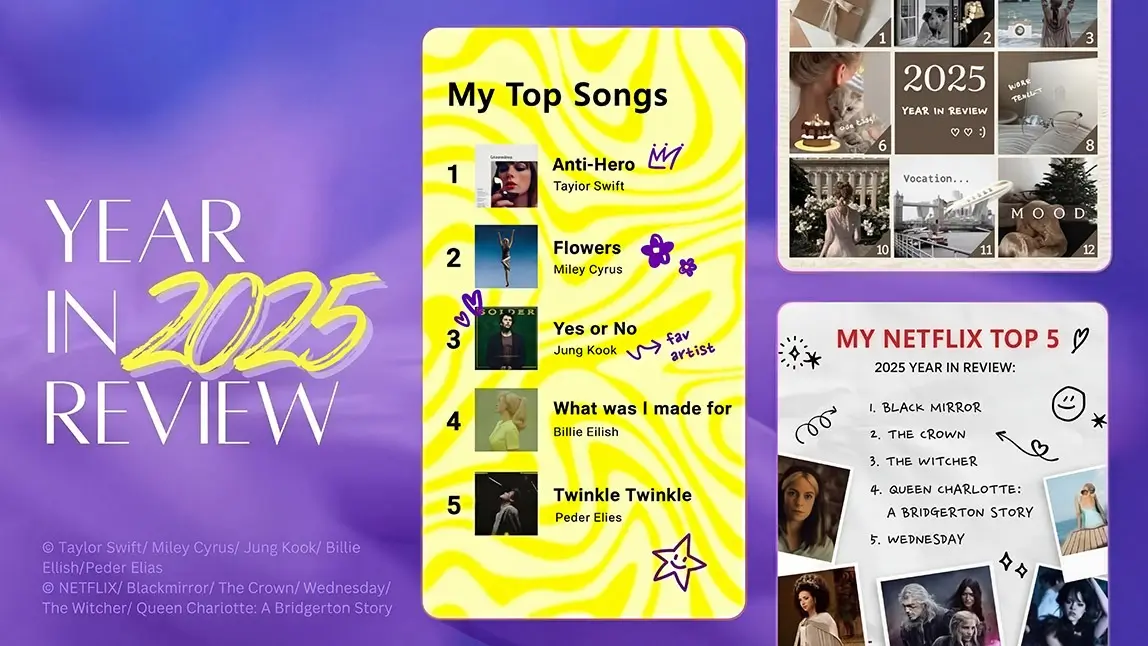
As we reach the end of the year, it’s time to look back on all your growth and memories from the past 12 months. A Year in Review photo recap puts all those experiences in one place so you can share them with others and acknowledge how far you’ve come.

Best AI Photo Editor
The Best AI Photo Editor & Selfie Camera.
Remove objects, apply filters & more.
What Is a Year Recap or Year-in-Review Photo?

A year recap is a visual summary of your past 12 months, typically created using photos arranged into a collage or photo dump. Instead of scrolling endlessly through your camera roll, a year-in-review photo recap highlights your most meaningful memories in one cohesive layout.
In 2025, year recaps have evolved from traditional scrapbooks into digital, AI-powered photo recaps optimized for Instagram, TikTok, Stories, and Reels. These recaps often include:
-
Travel highlights
-
Friendships and family moments
-
Career or personal milestones
-
Everyday snapshots that defined your year
Many people now create Wrapped-style year recaps, inspired by Spotify Wrapped, using photos, captions, and creative layouts to tell their story visually.

▲ Create your 2025 music wrapped even without the music streaming app
How To Make 2025 Year Recap?

A 2025 photo recap or 2025 photo dump highlights your favorite moments—from travel and friendships to milestones and everyday memories—in a single, shareable visual format.
With AI Agent in YouCam Perfect, you can generate a unique 2025 photo recap or photo dump-style image in just a few taps—no manual layout, no design experience required. Just follow these 4 simple steps:
Step 1: Open AI Agent in YouCam Perfect
Launch YouCam Perfect and tap AI Agent from the home screen.
Best AI Photo Editor
The Best AI Photo Editor & Selfie Camera.
Remove objects, apply filters & more.
Step 2: Upload Your Photos
Upload multiple photos you want to include in your 2025 photo recap or photo dump.

Step 3: Enter Your Prompt
Describe the look and mood you want. For example:
-
“Create a 2025 photo dump with a minimalist aesthetic and soft lighting”
-
“Turn these photos into a 2025 year recap collage with scrapbook style”
-
“Create a trendy social-media-style 2025 photo dump with film grain and natural poses”
AI Agent will understand your intent and generate a cohesive visual automatically.
Step 4: Generate & Save
Tap Generate, review the result, and save your 2025 photo recap to share on Instagram, TikTok, or keep as a personal memory.

How to Create a Year-in-Review Photo Recap With YouCam Perfect
Step 1: Download the Best Year Recap Maker App
You can find YouCam Perfect complete with collage templates on Google Play or in the App Store.
Best AI Photo Editor
The Best AI Photo Editor & Selfie Camera.
Remove objects, apply filters & more.
Step 2: Select Photos to Create Your Year Recap

On the main screen, choose the Collage feature to bring up your phone’s photo album. Select the photos you want to include in your Year in Review, or use YouCam Perfect to take new photos on the spot to use in the collage.
The number of photos you choose will automatically filter your results in YouCam Perfect, so you’ll only see template options that fit the story you want to tell!
Step 3: Navigate to Collage and Choose Year Recap Templates

YouCam Perfect has collage templates that feature up to six photos in grid and poster styles. Poster gives you extra customizability with design options like:
- Life Moments: Highlight your day-to-day routine, from the office to chill sessions at home with nostalgic bulletin boards and scrapbook-style templates.
- Love: Include your bae in your Year in Review with a romantic collage.
- Classic: Stick to tradition with balanced, symmetrical designs.
- Scrapbook: Preserve your memories digitally with old-school templates that bring you back to the days of photo booths and taping ticket stubs to journal pages.
- Minimalist: Keep things simple with neutral backgrounds that put the focus on your memories.
- Dreamy: Give your photos an ethereal vibe with watercolor backgrounds, pastels, and experimental photo frames.
When you’ve chosen your template, save it, and the year-in-review app will take you to the rest of its photo editing tools so that you can personalize it.
Step 4: Add Captions & Stickers to Your Year Recap

Emojis and themed stickers add an even more personal element to your photo collage. YouCam Perfect has themed sticker collections that you can match to any occasion, from your summer vacation to birthday celebrations to your everyday mood.
The text feature (currently supports 300+ font styles) lets you write your own captions and messages, too, so you can remember exactly what you were doing and how you felt in the moment. Your words add context both for others to relate to your memories and for you to reconnect with them years later.
Step 5: Share Your Year-in-Review Photo Recap

▲ How to achieve the look: Tap the Store icon > Collage > Film/Scrapbook
When you’re happy with your Year in Review, save it to your phone or share it from YouCam Perfect. On the Save screen, tap the logo for the platform where you want to show off your new collage.
Then, ask your friends and followers to share their own memories from the past year!
Tips for a Memorable Year-in-Review Recap

▲ Easily re-create the popular music-wrapped styles with various background styles
-
Start your Wrapped 2025 year recap by selecting photos that capture meaningful moments and milestones from the past year
-
Enhance each image with filters and photo editing tools to set the mood and highlight emotions
-
Explore different collage layouts and photo dump styles to find the best way to tell your story
-
Customize colors, backgrounds, text, and stickers to match your personal aesthetic
-
Finish your year-in-review by pairing it with music that reflects your memories and makes your 2025 photo recap more engaging
Why YouCam Perfect Is the Best Year-in-Review Apps for 2025
YouCam Perfect stands out as one of the best year-in-review and photo recap apps for 2025 because it combines advanced AI photo editing with easy-to-use creative tools—no design experience required.
Photo Editing Features That Make Year Recaps Better
-
AI Agent: Automatically generates photo recaps and photo dumps from multiple images
-
Year Recap Collage Templates: Grid, poster, scrapbook, minimalist, and Wrapped-style layouts
-
Text & Stickers: 300+ fonts and themed stickers for captions, dates, and highlights
Whether you’re creating a personal year recap or a social-media-ready photo recap, YouCam Perfect gives you full creative control in just a few taps

▲ Creative Year recap tip: Make your receptify-style photo recap
Customize your Year in Review to share with others or save it for yourself to look back on next year when you put together another one. Download YouCam Perfect, the year recap maker app, for iOS or Android to tell the story of how you got to where you are now!


![[Free Download] 100+ Holiday Templates for iOS & Android](https://plugins-media.makeupar.com/smb/blog/post/2025-12-19/webp_561d6e6f-104d-4436-80d6-fdc69bd1b589.jpg)
