Author:


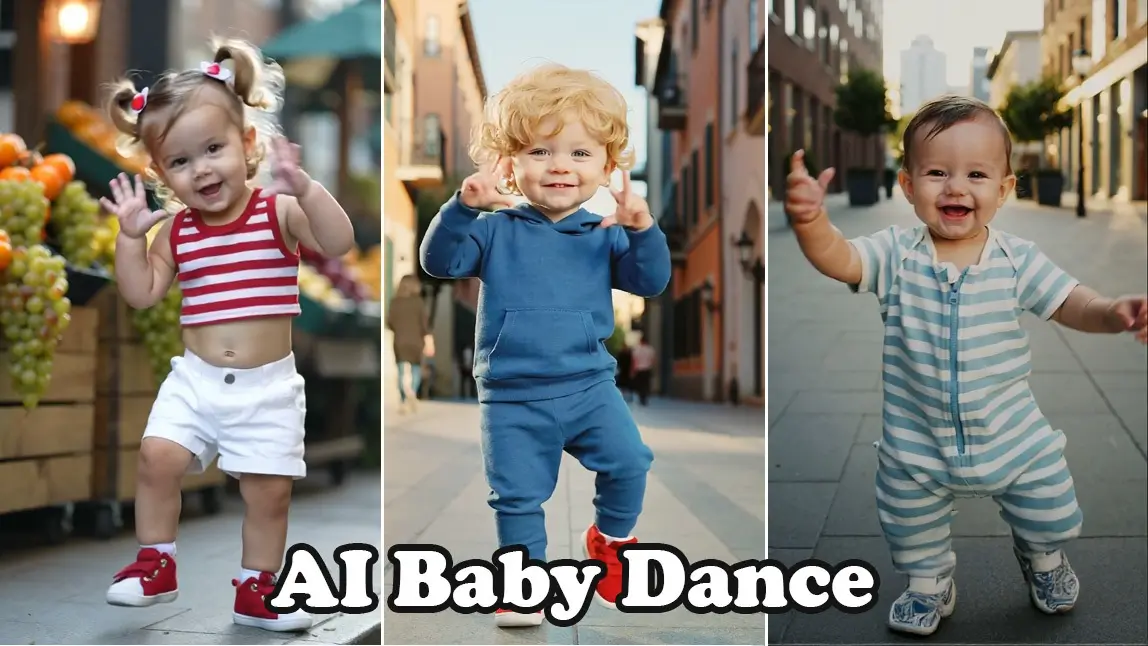
Cute, chaotic, and impossible to stop watching, the AI Baby Dance trend has taken over TikTok and Instagram. With just one baby photo and AI, you can turn an image into a viral AI dance video that feels made for endless scrolling.
In this article, we’ll explain what the AI Baby Dance trend is and how to make your own baby dance video using YouCam Makeup's Image to Video and AI Agent.
What Is the AI Baby Dance Trend?
AI Baby Dance is a viral AI video trend where users upload a baby photo to turn into a short dance clip paired with the trending "Music Music Music Dance" song.

The result is a baby that looks like it’s confidently dancing to music with exaggerated moves, playful energy, and peak cuteness. This trend has exploded on social media because it combines babies, motion, and surprise, three things algorithms love.
Why AI Baby Dance Videos Are Going Viral
Instant Feel Good Content
AI baby dance videos are emotionally comforting. Watching a tiny baby dance happily creates an immediate mood boost and stress relief effect.
Built In Cuteness Factor
Humans are naturally wired to respond positively to baby-like features such as round faces and big eyes. When AI adds dancing motion, the novelty and humor multiply.
Emotional Connection for Parents
Parents love imagining their baby expressing personality, confidence, and joy. AI baby dance videos tap into that emotional projection.
Easy to Watch, Easy to Share
No storyline needed. These videos are instantly understandable, loopable, and perfect for short form platforms like TikTok and Instagram Reels.
How to Make AI Baby Dance Video with YouCam Makeup
YouCam Makeup makes it easy to create AI baby dance videos using AI Image to Video, creative motion templates, and AI Agent. No editing experience required.
Method 1: Use Image to Video for AI Baby Dance (Kling AI)
Behind many viral AI dance videos is Kling AI, one of the most advanced AI video generation models known for realistic motion, smooth body dynamics, and natural facial consistency. You can also use the newest Kling O1 model in YouCam Makeup. Here's how:
Step 1: Download YouCam Makeup for free on iOS or Android.
Step 2: Choose the Image to Video feature and choose a dance animation template. If you don’t see any templates you like, you can also choose to use a prompt with the Kling AI model.

Step 4: Tap Generate and let AI turn your baby photo into a dancing machine.
Method 2: Create a Custom Baby Dance with AI Agent
Best if you want full creative control over the dance style and setting.
Step 1: Open YouCam Makeup and tap on the AI Agent feature.
Step 2: Upload a photo or directly type in a prompt to generate the video from scratch.

Step 3: Generate your video and preview the result.
Best AI Baby Dance Prompts to Copy and Paste
Copy and paste these AI prompts directly in YouCam Makeup to create your video instantly!
- Generate a video of a chubby baby wearing colorful pajamas dancing happily with exaggerated arm swings and bouncy steps, cheerful mood, playful energy.
- Generate a video of a cute baby performing a funny hip hop dance on a bright stage, energetic rhythm, joyful facial expression, viral social media style.
- Generate a video of a smiling baby dancing to upbeat pop music, tiny feet moving side to side, lively, adorable, and loop friendly.
How to Create AI Dancing Baby Online
If you prefer creating AI baby dance videos online without downloading an app, YouCam Online Editor offers an easy, browser-based solution. Its AI Video Generator lets you turn a baby photo into a dancing video in just a few clicks, making it perfect for quick content creation and viral trends.

With YouCam Online Editor, you can upload a clear baby photo, select an AI Image to Video animation style, or enter a custom dance prompt. The AI automatically adds smooth motion, playful expressions, and natural body movement while keeping the baby’s facial features recognizable.
Powered by Kling AI: Why These Baby Dance Videos Look So Real
Kling AI specializes in turning static images into lifelike motion, making it especially effective for trends like AI Baby Dance, where exaggerated yet believable movement is key.
The newest Kling O1 model improves motion continuity, rhythm accuracy, and body proportion handling—resulting in more fluid, loop friendly dance videos that feel made for TikTok and Instagram Reels.
YouCam Makeup Supports the Newest Kling O1 Model
YouCam Makeup’s Image to Video feature is powered by multiple cutting edge AI models, including the latest Kling O1. This means when you create an AI baby dance video in YouCam Makeup, you benefit from:
- Smoother dance motion with fewer visual glitches
- More natural body movement and rhythm sync
- Better facial preservation so the baby still looks recognizable
- Higher quality results optimized for short form social content
Create Cute AI Baby Dance Videos with YouCam Makeup
The AI Baby Dance trend shows how powerful and playful AI video creation has become. With YouCam Makeup, anyone can turn a single baby photo into a viral ready dancing video.
If you’re looking for an easy way to create cute, shareable, and eye-catching AI baby videos, YouCam Makeup makes it effortless to join the trend and stand out on social media.
More Fun AI Baby Ideas to Try
- 🎤 AI Baby Rapper – Turn a baby photo into a baby rapper.
- 📸 AI Baby Portraits – Create stylized baby portraits with artistic filters
- 👶 AI Future Baby – Explore what your future baby might look like
- ✨ AI Fantasy Baby – Transform baby photos into magical or storybook characters
About the Editors

The PERFECT Corp. Editorial Team
We are a team of experts on photo and video editing apps. Our goal is to deliver engaging content on everything from stunning selfie edits to eye-catching video effects. We cover the latest trends and share niche tips to help you master digital creation.
Discover more about us: