Author:


When you need to cut something out of your photo, you want an app that makes a clean edit. But how do you know which one to use?
We’ve tested and rounded up the six best free cut and paste photo apps and online tools for iPhone, Android, and web users in 2026. These apps make it simple to [remove backgrounds, cut out objects, create PNGs with transparent backgrounds, and blend images seamlessly] — no professional design skills required.

Which Is The Best Cut and Paste App?
We'll be sharing the 7 free image cutout apps and online tools to cut out images easily and naturally. We tested each one firsthand and share what actually worked below.
- YouCam Perfect: Best Cut and Paste Photo App
- Cutout.pro: Best for Online Image Cut-Out
- Photocut: Precise AI Image Cutout App
- piZap: 100% Free Cut and Paste App
- Photo Cut Out Editor: Photo Cutout App for iPhone
- Cut Cut: Easy-to-Use Android Photo Editor
- remove.bg: Best for Fast, Precise Edge Detection on Portraits
YouCam Perfect: Best Cut and Paste App

▲ Photo Cut and Paste with YouCam Perfect
Price: Free
Available on: iPhone and Android
Rating: 4.8 and 4.2
YouCam Perfect is best for quick cutouts to clean up clutter with seamless edits that you can share anywhere.
Its free Cutout tool uses AI technology to detect the background so you can easily cut the subject out in seconds.

▲ Auto AI Background removal before and after
Key Features:
- One-tap AI background removal for people and objects
- Replace backgrounds or combine multiple images into one composition
- Perfect for social media graphics, profile photos, and creative collages
The tool lets you cut out your subject instantly and change your background or combine different photos for a high-quality look.
How to Cut Out Images With YouCam Perfect
- Go to Photo Edit and choose a photo to upload from your phone.
- Tap the Cutout tool.
- Drag the Smart Brush over the person or subject you want to cut. You can also tap the AUTO AI button for instant detection.
- Tap the green check and use the background tool to make changes to your cutout.
Testing note: the AUTO AI button works well on a clearly separated subject against a plain background — on a busier background (a crowd, overlapping objects), switching to manually dragging the Smart Brush gives a cleaner edge than relying on auto-detection alone.
App Store reviewer AJ$212 (5★) called YouCam Perfect "the best Photo app," specifically citing that it "can remove distracting background objects," while Cynthiaann (1★) pushed back on the "free" framing, noting the app frequently prompts you to subscribe — worth checking the free vs. paid tier before relying on it for a lot of cutouts.
Cutout.pro: Best for Online Image Cutout
Price: Free
Available on: Web tool
Rating: N/A
Best for: Cutout.pro is best for removing the background from your photo to swap with another.
Cutout.pro instantly removes your background for a clean edit. You can change your background, add your image to a presentation, and create fun graphics easily.
How to Cut Out an Image With Cutout.pro
- Upload the image you want to cut out.
- The tool will automatically cut the portrait out for you.
- Download your photo!
Photocut: Precise AI Image Cutout App
Price: Free
Available on: iPhone
Rating: 4.4
Best for: PhotoCut is best for creating collages and stickers with your cutouts.
PhotoCut—Background Eraser has a simple cut-and-paste editor that instantly erases your background. With its auto templates, you have lots of options for background changes, or you can quickly cut out multiple photos to combine them into a stunning collage. The app also lets you create stickers and transparent images that you can put together any way you want.
How to Cut Out an Image With PhotoCut
- Select the Cutout tool.
- Use the outline brush to select what you want to cut out and the smart eraser to clean up any details.
- Choose a background for your photo.
piZap: 100% Free Cut and Paste App
Price: Free
Available on: iPhone and Android
Rating: 4.7 and 3.8
Best for: piZap is best for making edits easily with no editing experience necessary.
piZap’s precise cutout tools let you transfer one image to another with an adjustable brush tool. You can use its Custom and Shapes features to make precise cutouts, and then use the app’s other features to touch up and redesign your cutouts.
How to Cut Out Images With piZap
- With piZap, choose the photo you want to edit.
- Select the Cut-Out tool and select your brush size. Paint over the area you want to cut out.
- Use the Custom and Shapes features to refine your cutout.
- Apply your cutout to a new background or image.
Photo Cut Out Editor: Image Cutout App for iPhone
Price: Free
Available on: iPhone
Rating: 4.6
Best for: Photo Cut Out Editor is best for a wide variety of cutout tools to fit your editing needs.
Photo Cut Out Editor has seven cutout tools so that you can manually and smart-select the area you want to cut out. It comes with over 100 backgrounds and various effects and filters to enhance your snaps in just a few taps.
How to Cut Out Images With Image Cutout Editor
- Choose the cutout tool.
- Draw a line over the areas you want to cut out for smart selection.
- Choose the background option to change your background.
Cut Cut: Easy-to-Use Android Photo Editor
Price: Free
Available on: Android
Rating: 4.2
Best for: Cut Cut: Photo Editor & CutOut is best for replacing your cutout background and sharing with WhatsApp.
Cut Cut: Photo Editor & CutOut has lots of customization features, including backgrounds, to beautify your cutouts. Its cutout feature puts you in a new scene with intelligent technology that makes your edits look natural. Plus, you can keep up with WhatsApp status trends using its cutout tool, as well as its filters and stickers.
How to Cut Out an Image With Cut Cut
- Choose the Cutout tool.
- Brush over the area you want to cut out.
- Choose a new background from the app.
remove.bg: Best for Fast, Precise Edge Detection on Portraits
remove.bg is a web-based background remover known for accurate edge handling on portraits and complex hair, plus a developer-friendly API for batch processing. It integrates with Photoshop, Zapier, and works on both Windows and Mac.
How to Cut Out an Image With remove.bg
- Go to remove.bg and upload your photo.
- Wait a few seconds for the automatic cutout to process.
- Use the Magic Brush to touch up any missed edges.
- Download at full resolution (requires a paid credit or subscription).
Testing note: results were cleanest on portrait photos with well-defined hair edges — on a subject with thin, wispy strands or a background color close to the subject's own color, a manual touch-up with the Magic Brush was still needed.
Summary Table: Cut and Paste Photo Apps & Online Tools
| App & Tools | Rating (iOS and Android) | Feature |
| YouCam Perfect | 4.8 ; 4.2 | AI-powered cut and paste tools |
| Cutout.pro | N/A | Remove photo background online |
| Photocut | 4.4 (iOS) | Create collages and stickers with cutouts |
| piZap | 4.7; 3.8 | Easy-to-use cut and paste feature |
| Photo Cut Out Editor | 4.6 (iOS) | Offer a variety of cutout tools |
| Cut Cut | 4.2 (Android) | Great for replacing photo background |
| remove.bg | N/A | Fast, precise edge detection for portraits |
3 Use Cases to Cut Out Photos on YouCam Perfect
Make Photo Silhouette

▲ Create a silhouette with the AI Cut-Out
Creating stunning silhouettes is made easy with photo cutout tools. The tool utilizes advanced algorithms to precisely detect and isolate the subject of your choice, allowing you to effortlessly remove the background and create a clean silhouette.
Read more: How to cut out a photo and make a silhouette
Remove and Change Photo Background
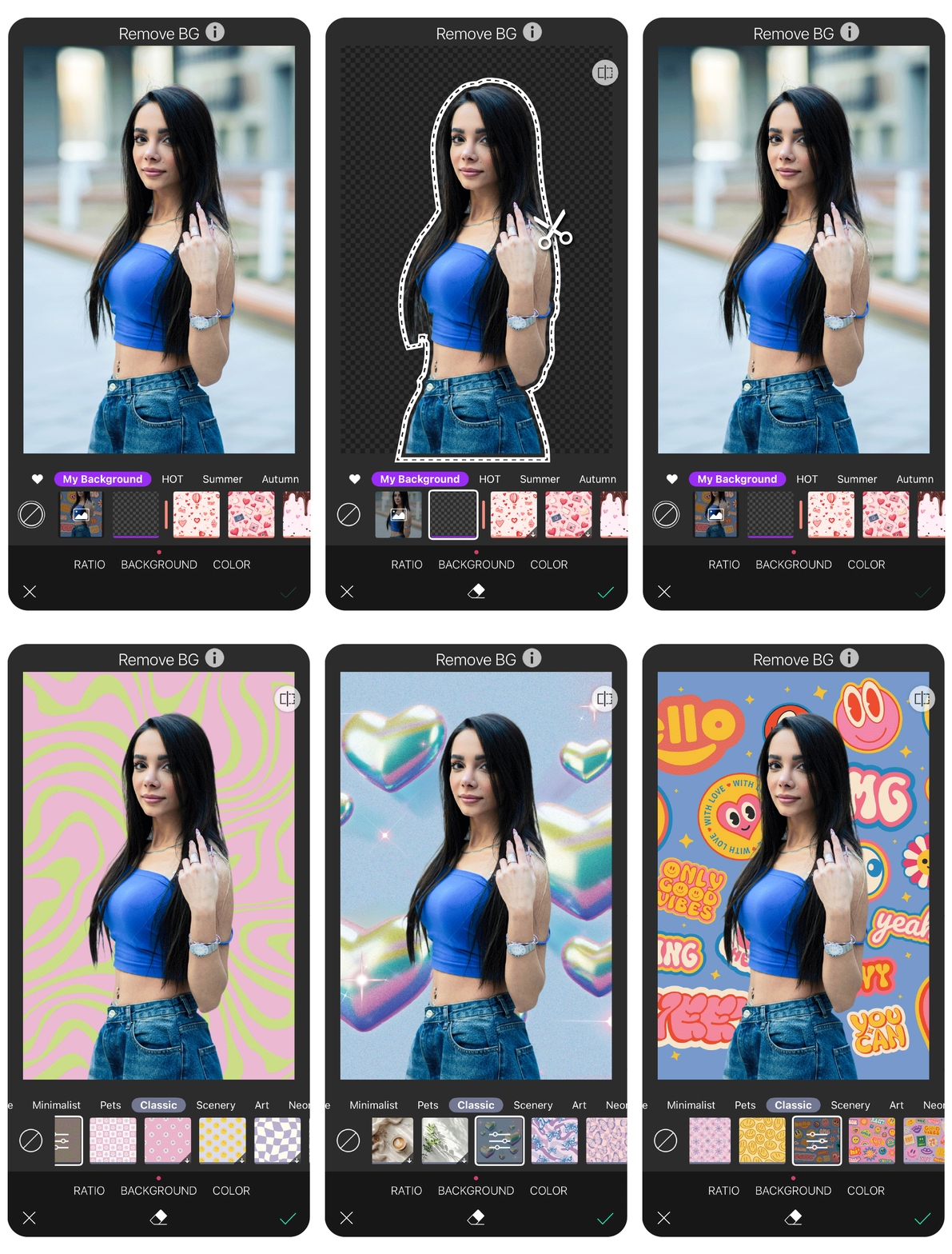
Whether you're looking to enhance product images, create stunning compositions, or craft eye-catching visuals, photo cut-out tools can provide the flexibility and precision you need for photo background changing.
Make Everyone Look Good in Photos

In group photos, there’s often someone making a funny face or not looking at the camera. With YouCam Perfect's "Cutout" tool, you can easily edit the photo to make sure everyone looks their best!
More Photo Editing Ideas
- Best Free Image Background Remover Apps
- How to Remove Background from Pictures
- How to Blur Photo Backgrounds