 Author:


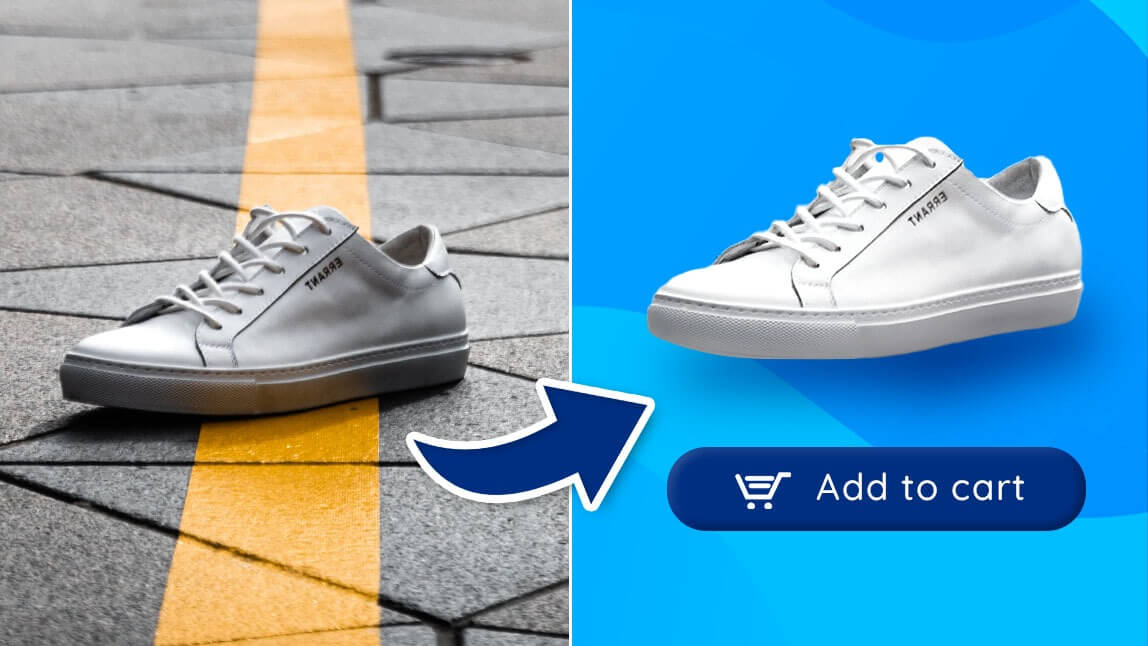
The fastest way to remove a background from a photo is to use an automatic background remover app: upload the image, let the AI detect the subject, and download the cutout in seconds.
Whether it’s for a profile picture, a product image, or a presentation, the easiest way is to use an automatic background remover app. These apps let you quickly erase the background and keep your photo in HD quality — no design skills needed.

Here are 15 image background removers for iPhone and Android that help you remove backgrounds from photos automatically. Keep reading to learn more and pick your favorite!
YouCam Perfect: Best Free AI Background Remover App

Best For: YouCam Perfect is the ideal background remover for people who want to remove and add backgrounds automatically with fun, creative designs.
Rating: 4.8 and 4.4

Here’s how to remove a background using YouCam Perfect:
- Open the app and tap "Photo Edit."
- Upload the photo you want to edit.
- Scroll through the toolbar and tap "Remove BG" to automatically erase the background.
- If you want to make sure it has a good HD quality after background removal. Try the "Enhance" feature too!

Freepik: AI Background Remover

Best For: Anyone who needs clean, professional cutouts for marketing, product photos, or social media.
Rating: 4.7
Available: Online and mobile
The Freepik AI Background Remover lets you cleanly remove backgrounds from any image in seconds. It’s designed for users who want quick, accurate cutouts without using heavy software. Just upload your photo and the AI isolates the subject immediately, keeping edges sharp and details intact.
To remove your background with Freepik, click “Upload Image,” choose your photo, and let the tool process it. You can then refine the result or pair it with Freepik AI editing tools, like the AI Photo Editor or Magnific AI Upscaler, to prepare the image for publication.
DepositPhotos: AI Background Remover

Best For: E-commerce sellers, marketers, and designers needing rapid, high-precision subject isolation for professional projects.
Rating: 4.8
Available: Online
The DepositPhotos AI Background Remover delivers exceptionally clean, automated cutouts in a matter of seconds. It is built to handle complex edges—like hair, fur, and intricate product details—without forcing you to deal with manual masking brushes or complex editing software. Simply drop your image onto the platform, and the neural network instantly separates the main subject from its backdrop while maintaining crisp, professional contrast.
To clear your background using DepositPhotos, go to the tool page and click "Upload Image" to select your file. The AI instantly processes the image, providing a transparent result that you can download immediately or use right away as a clean asset for your next marketing layout or commercial graphic.
VistaCreate: AI Background Remover

Best For: Content creators and small teams looking for a robust Canva alternative to quickly isolate subjects for social media graphics, ads, or marketing materials.
Rating: 4.6
Available: Online and mobile
The VistaCreate Background Removal tool is a highly efficient feature engineered to strip away complex backgrounds instantly. Tailored specifically for creators and agile teams who treat VistaCreate as their go-to alternative to Canva, this tool delivers precise, automated cutouts without requiring advanced graphic design skills. Its advanced algorithms seamlessly detect the main subject, handling fine details and tricky edges with impressive accuracy. To remove your background with VistaCreate, simply upload your image to the artboard, select it, and click the "Remove Background" button in the top panel. The AI processes the file in a single click, providing a clean canvas. From there, you can easily drop in new backdrops, apply brand colors, or continue editing your design using VistaCreate’s extensive library of templates and design objects to finalize your project for publication.
QuillBot: AI Background Remover for Content Creation Workflows

Best For: Creators, marketers, educators, and professionals who need clean visuals for digital content, presentations, and marketing materials.
Available: Online
QuillBot’s Background Remover helps users quickly remove image backgrounds and create clean, transparent visuals without requiring advanced editing skills. It is designed for users who want to prepare images for presentations, social media content, product visuals, and other digital assets.
What makes QuillBot useful is that background removal fits into a broader content creation workflow. Instead of only creating isolated cutouts, users can prepare visuals as part of their larger communication process, making it easier to move from ideas to finished content.
Adobe Express: Professional Background Remover App

Best For: Freelancers and professionals who need background removal services without leaving the Adobe Suite.
Rating: 4.8 and 4.6
Available: Online, iOS, and Android
Adobe Express allows you to quickly remove background images from photos when you are editing your creative project. This app is great for those who need background images, without having to leave their preferred software.
To remove your image background in Adobe Express, simply tap the "Add" mark and select "Remove background" once you launch the app. Then, upload your picture to remove the background.
PhotoRoom: Simple & Easy Photo Editor

Best For: Those who need background removal services with a fun twist.
Rating: 4.8 and 4.7
Available: Online, iOS, and Android
PhotoRoom is a background removal app with a fun twist. You can quickly remove background images and add custom backgrounds, effects, and shapes to really customize your image.
To remove your image background in PhotoRoom, tap the "Remove Background" once you launch the app. Then, select your picture to remove the background.
Background Eraser: Easy Background Remover App

Best For: Creators who want a simple background removal app that leaves room for creativity.
Rating: 4.9 and 4.9
Available: iOS and Android
Background Eraser is a removal app with a little more to offer regarding creativity. You can quickly remove any background with the Magic Mode, which automatically detects the background and traces around the subject for clean and clear removal.
To remove your image background in Background Eraser, simply tap the "Create" button once you launch the app. Then, upload your picture (or use their sample photo) to remove the background.
MagicEraser Background Editor: Remove Backgrounds with Details

Best For: Individuals who need a more detailed background removal app.
Rating: 4.8 and 2.7
Available: iOS and Android
The MagicEraser app is another free and simple option with powerful background removal features. You can quickly achieve a transparent background, add a new one, and use their high-resolution zoom to ensure a smooth cut-out. It also offers some fun sticker options for graphics, but if you want trendy backgrounds and layouts, this isn’t the best choice.
To remove your image background in MagicEraser, tap the "Remove Background" button as you launch the app. Then, upload your picture to remove the background.
Pixelcut: All-in-One Background Remover App

Best For: Those who want to create product photos with natural looks.
Rating: 4.7 and 4.4
Available: Online, iOS, and Android
Pixelcut provides the user with an array of photo editing tools, including a few that can help you remove and replace your background powered by AI. Moreover, the background eraser allows users to add adjustable AI shadows for more natural-looking product photos.
To remove your image background in Pixelcut, tap "Remove Background" to upload your picture to remove background. The AI will smartly achieve background cutouts within seconds.
Photo Cutout: Simple Background Remover App

Best For: Content creators who want a basic background removal app without a lot of additional features.
Rating: 4.6
Available: iOS only
Photo Cutout is an app specifically designed to remove backgrounds in photos. It’s free to download and easily removes backgrounds and objects in a snap. You can swap backgrounds, combine photos in a collage, and take advantage of its multiple cutting and erasing tools. It’s a straightforward app that focuses on removing unwanted backgrounds but doesn’t offer much else.
To remove your image background Photo Cutout, find the "3-Enclose" feature and select "One-click Cutout" once you launch the app. Then, upload your image to remove the background.
Adobe Photoshop: Advanced Background Removal App

Best for: People who want seamless background removal and added professional editing features.
Rating:
Available: iOS and Android
Tried and true, and probably the best-known name in photo editing software is Adobe Photoshop. Since it has been around, Photoshop has set the standard for both software and apps that edit pictures. While the tools take a little more practice or knowledge to utilize, they offer substantial flexibility and precision in return. The background removal tools in Photoshop are no exception to this notion.
To remove your image background in Adobe Photoshop Express, tap the "Photo Editor" icon once you launch the app. After uploading your shot, locate "Background" to remove/switch background colors.
PicWish: AI Background Remover App

Best For: Creators who want to add background effects for an extra creative touch.
Rating: 2.6 and 3.6
Available: iOS, Android, and Online
PicWish is a background removal app with a few extra features. You can remove background images quickly and easily, but the real fun comes with the background effects and filters. You can give your background images a unique touch by adding special effects, filters, frames, and more.
To remove your image background in Picwish, simply tap the "Cutout" button once you launch the app. Then, upload your photo to remove the background.
remove.bg: Automatic Online Background Remover App

Best For: Those who need background images for blog posts but running out of cellphone storage.
Rating: 4.8
Available: Online and Android
remove. bg is a background removal app tailored for those who need background images quickly and easily. You can upload any image and remove the background in just a few taps.
To remove your image background in remove.bg, tap the "Upload Image" button. Then, upload your picture (or use their sample photo) to remove the background.
DoMyShoot: Seamless Background Removal App

Best For: People who want a seamless background removal process, as well as access to AI-generated professional backgrounds and advanced editing features, will find our services to be highly beneficial.
Rating: 4.4 / 4.2
Available: Online, iOS and Android
DoMyShoot offers a user-friendly experience and sets a high standard for picture editing software and apps. You can easily remove and add backgrounds with over 8000+ backgrounds to choose from, and you can also create your own unique background by writing prompts.The greatest aspect is that this tool enables you to keep 100% of your money.
To remove a background, simply “upload an image” or “click a new one” on the spot. The background is instantly removed, allowing users to download or further edit the image.
How to Remove Background from Photo?
Here's how you can remove background using YouCam Perfect, one of the best free background remover app.
- Download YouCam Perfect
- Remove Background from Your Picture
- Add New Background to the Photo
Step 1: Download YouCam Perfect
First, you can find YouCam Perfect on App Store or Google Play. And then upload the image which you want to remove background from.
Step 2: Remove Background from Your Picture
Look for the 'Remove BG' feature in the toolbar. Once you tap on the icon, the background of your picture will be removed.
The AI tool automatically detects the main object or person in your photo, eliminating the need for complex manual editing.
From here, you can save your image as a PNG with a transparent background or change the background using a new picture or in-app options.
Step 3: Add New Background to the Photo

Feel free to change your background to add a different vibe to your picture. YouCam Perfect has a wide series of photo backgrounds you can choose from.
If you have a particular photo background in mind, you can also upload a new image to be your photo background.
Conclusion for Background Remover App
These background remover apps are great for quick and easy background removal without having to use complex tools.
With these background removal apps, you can quickly remove background images and add custom effects and backgrounds for a truly personalized look.
However, for professional or commercial purpose you may also adopt paid background removal service like hand made clipping path service. Clipping Mask Asia can be good option in this regards.
Automatic Background Remove Apps and Online Tools Comparison
| Background Remove App/Tool | Available Platform | Auto Removal Accuracy | Free Tier |
| YouCam Perfect | iOS/Android | ✔️ | Free (in-app purchases) |
| Freepik AI | iOS/Android/Web | ✔️ | Free (limited credits) |
| Adobe Express | iOS/Android/Web | ✔️ | Free (premium upgrade) |
| PhotoRoom | iOS/Android/Web | ✔️ | Free (limited exports) |
| Background Eraser | iOS/Android | ✔️ | Free (with ads) |
| MagicEraser | iOS/Android | ❌ | Free |
| Pixelcut | iOS/Android/Web | ✔️ | Free (limited) |
| Photo Cutout | iOS | ✔️ | Free |
| Adobe Photoshop Express | iOS/Android | ✔️ | Free (some features locked) |
| PicWish | iOS/Android/Web | ✔️ | Free (watermark on some exports) |
| remove.bg | Android/Web | ✔️ | Free (low-res only) |
| DoMyShoot | iOS/Android/Web | ✔️ | Free (limited credits) |