Author:


St. Patrick’s Day is all about embracing the Irish spirit, whether it’s dressing in green, attending parades, or celebrating with friends.
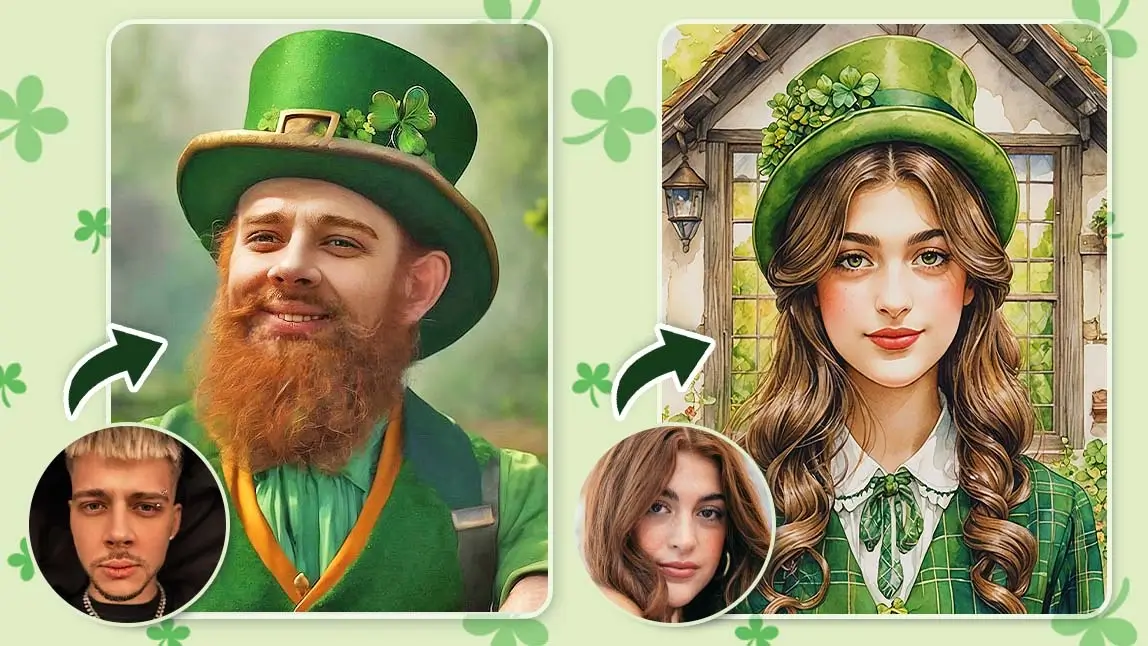
But what if you could take it a step further and actually turn your photo into a leprechaun or try a put your face on a leprechaun photo?
With YouCam Perfect, you can easily put your face on a leprechaun, create St. Patrick’s Day templates, and edit festive photos in seconds
Best AI Photo Editor
The Best AI Photo Editor & Selfie Camera.
Remove objects, apply filters & more.
Let’s explore how this app can turn your festive pictures into something truly special!
Why Use a Leprechaun Filter for St. Patrick’s Day?
Not everyone has a leprechaun costume lying around, but that doesn’t mean you can’t dress up digitally!

- Join in the holiday spirit without spending money on costumes.
- Create hilarious and unique content for social media.
- Surprise friends and family with your transformation.
Create a Festive AI Group Photo with St Patrick's Day Template
Want to celebrate St. Patrick’s Day with friends or family?
You can now create AI Group Photos using St Patrick's Day templates inside YouCam Perfect. This feature allows you to combine 2 portraits into one festive holiday image, perfect for social posts or greetings.
1. Select AI Group Photo
Open YouCam Perfect and tap AI Group Photo.

Best AI Photo Editor
The Best AI Photo Editor & Selfie Camera.
Remove objects, apply filters & more.
2. Choose a St Patrick's Day Template
Browse festive templates and choose a St Patrick's Day template.

3. Upload Two Portraits
Upload two portraits from your camera roll. The AI will automatically merge both faces into the template.
4. Generate and Save
Tap Generate and let AI create your St. Patrick’s Day group photo.
Save your image and share it online.

How to Put Your Face on Leprechaun
Ever wondered what you’d look like if you were a leprechaun? Maybe in some alternate reality where you're not just chasing rainbows, but dancing in them too?
Whether you’re just in it for some laughs or looking to surprise your friends with your festive spirit, the AI Face Swap tool is here to help you make your St. Paddy’s Day a bit more magical.
Follow these easy steps, and you'll have a leprechaun version of yourself ready to show off in no time:
1. Grab the YouCam Perfect App
First things first, you'll need the YouCam Perfect app to make this leprechaun magic happen. Head over to the App Store or Google Play to download it – the app’s free, so no pot of gold needed.
Best AI Photo Editor
The Best AI Photo Editor & Selfie Camera.
Remove objects, apply filters & more.
2. Find the AI Face Swap Feature
Once you’ve installed the app, open it and head straight to the AI Face Swap feature.

3. Upload Your Photo
Now comes the most important part: uploading your photo!
Choose a clear, high-quality picture where your face is clearly visible. Avoid any obstructed views, unless you want to see a very confused-looking leprechaun on your screen.
4. Let AI Work Its Leprechaun Filter Magic
Once you’ve uploaded your photo, let the AI do its thing! Watch as it transforms you into a pint-sized, mischievous leprechaun with all the festive charm you can handle.

It’s like magic, but better because it’s powered by cutting-edge technology.
5. Save and Share Your Leprechaun Self
And voila! Your leprechaun version is ready to go. Hit save, then share your newfound leprechaun self with friends and followers.
Whether you're posting it on Instagram or sending it as a funny message to your pals, prepare for some epic reactions!
Try Turning Your Photo into a Leprechaun with AI Studio
Best AI Photo Editor
The Best AI Photo Editor & Selfie Camera.
Remove objects, apply filters & more.
Ever wondered what it’d be like to rock some killer Irish charm? Well, now you can – in a matter of seconds, thanks to AI Studio!
To kick off your St. Patrick's Day celebration, YouCam Perfect has unveiled two enchanting new looks: Clover Cutie and Lucky Charm.
Ready to give your social media a shamrock shake-up? Here’s how to get started:
1. Navigate to AI Studio > Avatar
Once the app is installed, open it up and tap on “AI Studio”, then go to "Avatar"
 Now, upload a clear, unobstructed selfie – yep, just one! We’re not asking for a professional photoshoot, just your best natural glow.
2. Choose a St. Patrick's Day Template
Scroll through until you spot the brand-new Clover Cutie and Lucky Charm looks. Click on one, and let the AI sprinkle some Irish magic all over your avatar.
Presto – a fresh new you, ready to take on the festivities!

3. Save & Share Your Irish Alter Ego
Once you're happy with your Irish makeover, hit save and share it on your socials. Who needs luck when you’ve got AI on your side?
👉Read More: How to Catch a Leprechaun on Camera (No Trap Needed)
YouCam Perfect: Beyond the Leprechaun Filter
Let’s be real—while Face Swaps and AI Avatars are a total blast, YouCam Perfect isn’t just about turning you into a shamrock-covered leprechaun (though, honestly, that’s pretty awesome).
This app is a full-on St. Patrick’s Day photo playground! Ready to take your celebration to the next level?

YouCam Perfect has an exciting array of St. Patrick’s Day-themed photo frames, animations, and backgrounds that will make your snaps shimmer with festive magic.
From sparkling shamrocks to magical rainbows, there’s no limit to how creative you can get. So why settle for ordinary when you can go extraordinary?
Download the app now, and let the fun begin! Your best St. Patrick's Day photos are just a tap away! 🍀